


The distance between “I have an idea” and “I have a working app” keeps shrinking. Visual builders that once produced brittle demos now generate production React and connect to governed enterprise data. But entry prices sit in two bands, $20 to $25 for per-seat and prompt-to-app tools and $59 upwards once you reach Bubble, so the headline number tells you almost nothing, and the decision that actually costs money — how easily you can leave — appears on no pricing page.
| Quick answer: Low-code AI platforms let you build working software through visual builders and AI prompts instead of hand-written code. Choose Microsoft Power Apps for the Microsoft stack, Bubble for customer-facing web apps, Retool or ToolJet for internal tools, and Lovable, Bolt.new or Replit for prompt-to-app builds. Entry pricing runs $20 to $25 a month on most platforms, with Bubble starting at $59; the expensive part is migration. |
Disclosure: TechieHub may earn a commission if you sign up for a platform through links on this page. This never affects which tools we recommend or how we rank them — we pay for our own accounts.
Table of Contents
What are low-code AI platforms, and why do they matter in 2026?
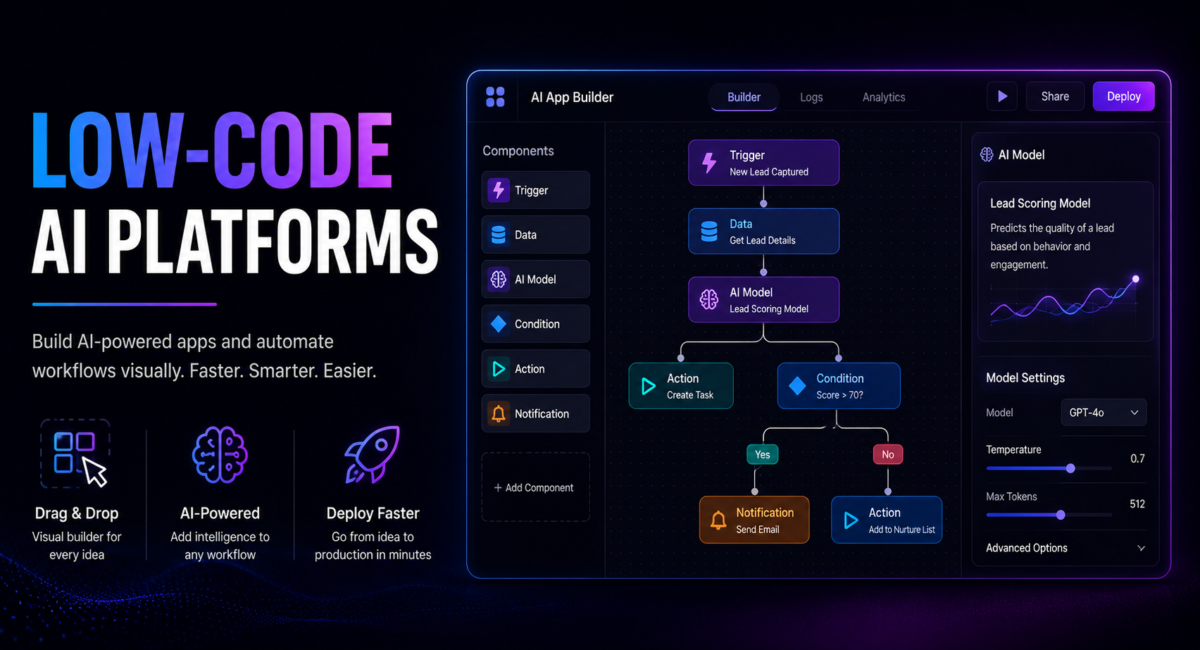
Low-code AI platforms are application-development environments that combine visual, drag-and-drop composition with generative AI, letting teams build working software through configuration and natural-language prompts instead of hand-written code. That covers a wide spectrum, from IT-governed enterprise suites to prompt-driven builders a founder can use over a weekend.
Gartner forecasts that 75% of new applications will be built with low-code or no-code technology by 2026, up from roughly 40% in 2021, and sizes the low-code market at $44.5 billion in 2026, rising to $58.2 billion by 2029. Two adjacent predictions explain why AI reshaped the space so fast: 90% of enterprise software engineers will use AI code assistants by 2028, up from under 14% in early 2024, and 40% of enterprise applications will ship task-specific AI agents by the end of 2026. Assisted building is now the default expectation, not a differentiator.
The practical consequence is that the builder is no longer the product. What you buy in 2026 is a runtime, a data layer, a permissions model and an AI credit meter, with the canvas as a friendly surface on top. Most teams end up pairing one with dedicated AI automation tools for the jobs that never needed an interface at all.
How is no-code different from low-code and AI-native building?
The three labels overlap in marketing and diverge in practice. No-code platforms require zero programming: you assemble the app through a visual canvas, which suits standard patterns such as forms, approvals and record management. Low-code is visual-first but keeps an escape hatch into real JavaScript, Python or SQL when logic outgrows the canvas — the difference that decides whether a project survives its second year. AI-native builders invert the model: you describe the outcome in plain language and the platform generates the schema, interface and queries.
The AI-native tier is where model quality shows up directly in product quality. Anthropic’s current flagship, Claude Opus 5.5, carries a one-million-token context window that lets a builder hold an entire codebase in view while editing it — which is why prompt-to-app tools improved faster than their interfaces did. If your ambition is an autonomous system rather than a screen, that capability is better spent on building an AI agent than on a form builder.
Match the tier to the ceiling of your ambition, not the floor of your current task: no-code for standard patterns, low-code when custom logic is certain, AI-native when speed to a working artifact beats architectural control.
Which platform should you choose for your use case?
How we compare: we score platforms on five axes — real cost at 50 and 500 users rather than headline price, whether source code can be exported, the AI features genuinely included in the entry tier, governance controls such as SSO, RBAC and audit logs, and the documented exit path. Pricing below was verified against vendor pricing pages on 2 October 2026. Two exceptions we label in the text: Lovable and Bolt.new render their plans in-browser, so those are the publicly listed rates.
| Platform | Best for | Entry pricing (October 2026) |
| Microsoft Power Apps | Microsoft-stack enterprise apps | $20/user/mo; $12/user/mo at 2,000+ seats |
| Retool | Internal tools and admin panels | $10/builder + $5/end user; Business from $50/user |
| ToolJet | Open-source, self-hosted internal tools | $24/builder + $8/end user; free self-host tier |
| Bubble | Custom customer-facing web apps | $59/mo Starter; $209 Growth; $549 Team |
| Lovable / Bolt.new | Prompt-to-app web MVPs | $25/mo (Bolt teams from $30/user) |
| Replit | Developers who want to edit the generated code | $20–$25/mo including usage credits |
Power Apps — the default inside a Microsoft estate
Power Apps remains the default when your data already lives in Dataverse, SharePoint or Dynamics 365. One stale claim worth correcting: guides still describe it as bundling 500 AI Builder credits per user. Microsoft changed that on 1 November 2025, and its official AI Builder licensing documentation states that seeded credits in Power Platform and Dynamics licences will be removed in November 2026, new customers must buy Copilot Credits instead, and AI Builder trials are discontinued. Copilot Studio bills separately at $200 monthly for 25,000 Copilot Credits.
Retool and ToolJet — internal tools and admin panels
For internal tools, Retool builds admin panels fastest and ships SSO, RBAC and audit logs; ToolJet is the open-source counterweight, with self-hosting and builder-weighted pricing that does not punish wide rollouts. When the requirement turns out to be a background process rather than an interface, a dedicated AI workflow automation platform beats a hosted app nobody opens.

What do these tools actually cost once you scale?
Three pricing models dominate. Flat monthly is most predictable: Lovable and Bolt.new at $25 and Bubble from $59, one fee regardless of headcount. Per-seat scales with your team: Retool at $10 per builder plus $5 per internal user on annual billing ($12 and $7 monthly), Power Apps at $20 per user, ToolJet at $24 per builder plus $8 per end user. Usage-based meters charge per AI interaction, and this is the model that surprises people: Replit’s Core plan includes $20 of model credits, yet heavy users report $100–$300 monthly once agent runs pile up.
Per-seat pricing compounds hardest. A Retool deployment reaching 500 internal users can approach $7,500 per month — a number nobody models on day one, because on day one there are four users. The protective discipline is boring: build a three-year total-cost-of-ownership estimate at ten times your current user count before signing, and treat the AI credit meter as its own variable line. Transparent published pricing lets you do that arithmetic; custom-quote vendors usually do not.
Building the app is only part of the cost. In a three-year worked example, Arch puts total ownership near £140,750, with the build at 53% of it.
What is the vendor lock-in trap, and how do you avoid it?
Two hidden costs turn a cheap platform into an expensive mistake. The first is the rewrite rate: surveys of citizen-development programmes consistently put the share of no-code projects eventually rebuilt in conventional code at roughly a quarter to a third. That is not a failure of the tools but a consequence of success — an app that gets used grows requirements the canvas was never designed to express.
The second cost is larger. Vendor lock-in means the application is welded so tightly to one runtime that leaving requires rebuilding it, and for a mature internal system that migration commonly runs from tens of thousands to low six figures in engineering time. The mitigation is structural, not contractual: favour platforms that export real source code or are open-source, keep business logic in a database you own, and confirm the export path before you build.
How one operations lead rebuilt a claims dashboard in nine days
Claire Dubois runs claims operations for a 140-person insurance brokerage in Manchester. Her team tracked open claims in a shared spreadsheet four people edited at once; adjusters lost roughly an hour a day reconciling conflicting rows, and nobody could answer “how many claims are stalled past 14 days” without a manual export. Internal IT quoted six months for a proper application.
Claire prototyped instead. She described the workflow to an AI-native builder and had a claims table with filters and status transitions by that afternoon — then hit the wall every prototype hits: single sign-on, row-level permissions so adjusters saw only their own book, and an audit trail compliance would accept. She moved the prototype onto a self-hosted ToolJet instance pointed at the brokerage’s existing PostgreSQL claims database, copying no data and creating no new system of record, and rebuilt the interface in six days with a contract developer writing three custom SQL queries.
Nine days from spreadsheet to production. Reconciliation time fell from about an hour per adjuster per day to near zero, the stalled-claims question became a saved filter, and because the app runs on the brokerage’s own infrastructure against its own database, outgrowing ToolJet would mean rewriting an interface, not migrating the data. Prototype where it is fastest, rebuild where it is durable.
This example is a composite of the internal-tool rebuilds we see most often, not a single client account; the figures are typical rather than measured from one engagement.
Frequently Asked Questions
What are low-code AI platforms?
Low-code AI platforms are development environments that combine visual, drag-and-drop app composition with generative AI, so teams build software through configuration and natural-language prompts instead of hand-written code. They span no-code drag-and-drop tools, low-code platforms with a code escape hatch, and AI-native builders that generate an entire application from a prompt.
How much do these platforms cost in 2026?
Most start between $20 and $25 a month, and Bubble is the outlier. Power Apps is $20 per user monthly, dropping to $12 at 2,000-plus seats; Lovable and Bolt.new are listed at $25; Replit Core is $20 ($18 billed annually) with $20 of model credits; and Bubble now starts at $59 for Starter, rising to $209 on Growth and $549 on Team. Per-seat and usage meters can multiply these figures substantially at scale.
Does Power Apps still include free AI Builder credits?
Not for long. Microsoft’s licensing documentation confirms that AI Builder credits seeded in Power Platform and Dynamics licences are being removed in November 2026, new customers must purchase Copilot Credits instead, and AI Builder trials are discontinued. Copilot Studio is billed separately at $200 monthly for 25,000 Copilot Credits, so budget AI usage independently.
Can you build mobile apps without writing code?
Yes, though support varies widely. Power Apps, Zoho Creator, Mendix and OutSystems all target mobile, and FlutterFlow generates genuine Flutter projects you can export and compile yourself. Retool and most prompt-to-app builders remain web-first. Confirm native mobile output before committing if app-store distribution is a hard requirement.
Are these platforms safe for production systems?
They can be, with the right controls. Require SSO, role-based access control, audit logging and either self-hosting or a documented data-residency guarantee. Keep your business data in a database you own rather than proprietary platform tables, and choose a platform that exports source code so a future migration rewrites the interface, not the system of record.
What does low-code AI mean?
Low-code AI covers two different things that buyers routinely confuse. The first is using AI to build software — describing an app in prose and having the platform generate the interface, data model and logic, which is what Lovable, Bolt.new and Replit do. The second is building software that uses AI — dragging a model call into a visual workflow so your app can classify, summarise or extract, which is what Power Apps, Retool and ToolJet added to existing low-code stacks. Decide which one you need before comparing prices, because the two groups barely compete with each other.
What are the best low-code AI tools for internal apps?
Internal tooling is where low-code pays off fastest, because the audience is small, the design bar is lower and the integrations are the hard part. Retool leads when your data sits behind existing APIs and databases and you need granular permissions. ToolJet is the credible open-source alternative when self-hosting matters for data-residency reasons. Retool starts at $10 per builder plus $5 per end user; ToolJet at $24 per builder plus $8 per end user. Microsoft Power Apps wins by default in organisations already committed to Microsoft 365 and Dataverse, less on capability than on governance and licensing that is already paid for.
Is low-code the same as no-code?
No, and the difference shows up exactly when a project gets serious. No-code platforms are closed by design: everything happens in the visual builder, which makes them fast to start and hard to extend. Low-code platforms expect you to drop into real code — JavaScript, SQL, custom components — at the points where the visual layer runs out. For anything that will outlive its first quarter, the ability to escape into code is what determines whether you finish the project or rebuild it, which is why the lock-in question matters more than the entry price.
Can you export your code if you leave the platform?
It depends on which of the three groups you picked, and it is the question to settle before you build anything. AI-native builders such as Lovable, Bolt.new and Replit generate real application code you can take with you, which makes them the lowest-risk route if portability matters. Open-source platforms like ToolJet let you self-host, so leaving is a migration rather than a rebuild. Proprietary visual platforms — Power Apps and Bubble among them — hold the application in their own runtime, so what you have built does not travel. Decide how much that matters while the project is small, because the cost of finding out later is a full rewrite.
How much does a low code AI platform cost?
A low code AI platform typically starts between $20 and $25 a month. Power Apps is $20 per user, dropping to $12 at 2,000-plus seats, and prompt-to-app low code AI tools such as Lovable and Bolt.new sit in the same band, while Bubble starts higher at $59. The larger cost comes later if you have to migrate off the platform.
Which low-code platforms can build AI agents?
Inside a Microsoft estate, Copilot Studio is the low-code agent builder, billed separately from Power Apps at $200 a month for 25,000 Copilot Credits. Most visual app builders in this guide add AI features to screens rather than run autonomous agents, so if the goal is software that acts on its own across your systems, pair the platform with a dedicated automation or agent tool rather than forcing it into a form builder.
Conclusion
Entry prices are nearly identical and therefore nearly useless as a decision input. What separates a good choice from an expensive one is whether the platform can carry the app to the scale you actually expect, and whether you can leave when it cannot. Match the tier to your ceiling, model three-year cost at ten times your current headcount, and verify the export path before you build anything real.
Prototype fast, rebuild durable, own your data. Teams that follow that sequence get the speed without inheriting the migration bill — and usually discover that only part of their backlog needed an application at all. The rest belongs in the broader AI automation stack, where there is no interface to maintain.
