


How we compare: our editors test each tool on real projects and verify pricing against official product pages on the day of publication. Some links are affiliate links; they never change our picks, and we earn a commission only if you subscribe.
Background: our explainer on why generative AI matters covers the measured economic impact behind these tools.
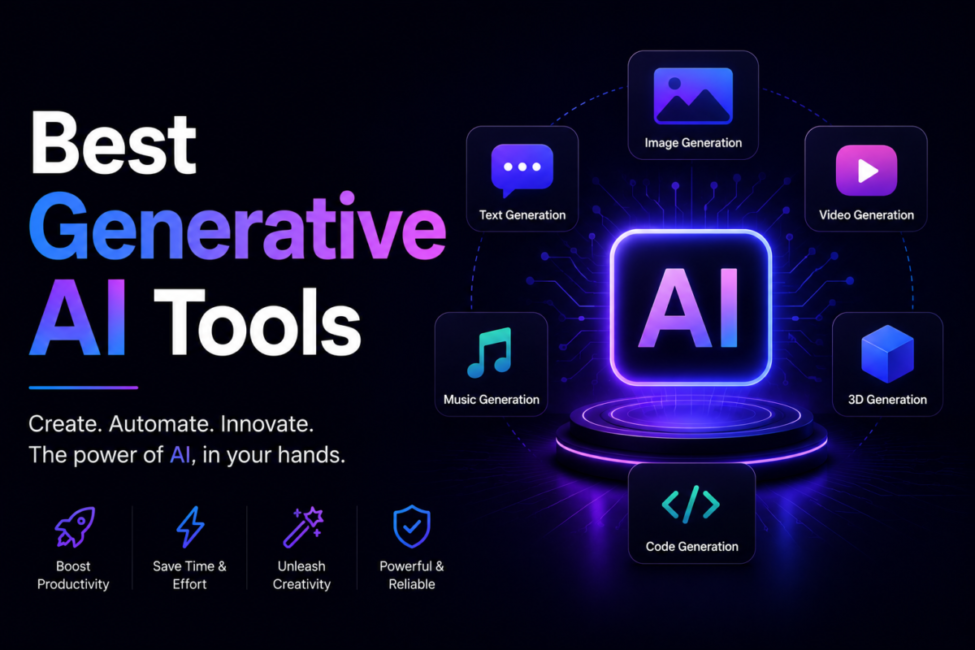
The best generative AI tools fall into five categories: ChatGPT, Claude and Gemini for text; Midjourney, DALL·E and Adobe Firefly for images; Google Veo, Runway and Kling for video; ElevenLabs and Suno for audio; and GitHub Copilot, Cursor and Claude Code for code. Most have free tiers, with paid plans from about $10 to $200 a month.
Table of Contents
Quick answer: Generative AI tools fall into five categories — text, image, video, audio and code — and the practical answer is to pick one per category rather than hunting for an all-in-one. A general assistant such as Claude or ChatGPT covers text and reasoning at about $20 a month, with dedicated tools layered on where output quality actually matters to your work.
What are generative AI tools?
Generative AI tools are applications that create new content—text, images, video, audio or code—from a natural-language prompt. Unlike analytical AI that classifies or predicts, a generative tool produces original output: a blog draft, a product photo, an explainer clip, a voiceover or working software. They are the everyday, practical face of generative AI—the apps that turn raw models into things you can ship.
The category is expanding fast. Statista projects the worldwide market to reach roughly US$394.66 billion in 2026, growing about 12.6% annually through 2032. Marketers draft copy and visuals, developers ship faster, and small teams produce media that once required a studio. This guide organizes the leaders by content type, with verified pricing and free options, so you can build a stack that fits your work. And because new models launch monthly and today’s leader can be overtaken within a quarter, the durable skill is knowing what each category is for and how to judge a new entrant—the picks below are current, but the framework for choosing lasts.
The five categories, explained
The tools sort cleanly into five groups by what they create. Text tools handle writing, research and chat. Image tools turn prompts into visuals for marketing, social and mockups. Video tools produce clips, explainers and avatar presentations. Audio tools synthesize voiceovers, narration and music. And code tools write, explain and debug software.
Most real workflows combine categories—a single campaign might use a text tool for copy, an image tool for graphics and a video tool for a social clip. Leading general assistants now handle text, basic images and code in one interface, even as specialized tools push quality further in each lane. Our deep dives cover the best AI video generator and the best AI tools for generating images.
Deep dives by category: writing tools and ChatGPT alternatives for text, image generators, video generators, text-to-speech tools for audio, and coding tools. For the models underneath them all, see our comparison of the best AI models.
The best picks by category
| Category | Leader | Typical 2026 price | Best for |
|---|---|---|---|
| Text and chat | ChatGPT, Claude, Gemini | Free; ~$20/mo pro tiers | Writing, research, analysis |
| Image | Midjourney; Adobe Firefly | $10–$60/mo; Firefly $9.99 | Art direction; licensed-safe output |
| Video | Google Veo 3.1; Kling 3.0 | ~$0.15/sec; Kling ~$10/mo | Native 4K with synced audio |
| Audio | ElevenLabs; Suno | From ~$5/mo; Suno Pro $10 | Voice synthesis; full-song music |
| Code | GitHub Copilot; Cursor | $10/mo; Cursor Pro $20 | IDE assistance; agentic editing |
Here are the current leaders in each category, with typical 2026 pricing. Most offer free tiers, so you can test before you pay.
Text and chat
ChatGPT, Claude and Gemini all start free and sit around $20 a month for standard pro tiers (ChatGPT Plus $20, Claude Pro $20, Google AI Pro $19.99), with premium tiers climbing to $100–$200 for heavy reasoning and higher limits. For dedicated marketing and long-form writing, tools such as Jasper and Copy.ai add brand voice, templates and SEO features—see our guide to the best AI writing tools.
Image
Midjourney leads on cinematic, art-directed output ($10–$60 a month; the popular Standard tier is $30). DALL·E is bundled into ChatGPT Plus. Adobe Firefly Standard is $9.99 a month for 2,000 credits and is the only major model shipping contractual IP indemnification, because Adobe trains on licensed and public-domain material. For developers, FLUX.2 runs roughly $0.01–$0.10 per image on hosted APIs, and aggregators such as fal.ai expose 1,000-plus models through one API.
Video
Google Veo 3.1 is the enterprise-safe pick, generating native 4K with synchronized dialogue via Google AI Pro or API (around $0.15/sec on the fast tier). Kling 3.0 offers native 4K, 60fps and multilingual lip-sync at strong value (about $10 a month). Runway Gen-4.5 keeps the best creative control—motion brushes and scene consistency—from $12 (Standard) to $76 (Max) a month, while OpenAI’s Sora 2 and Synthesia (avatars) round out the field.
Audio
ElevenLabs sets the bar for realistic voice synthesis, with commercial use from its Starter tier (around $5–$6 a month) and credits shared across voice, speech and music. Suno leads full-song music generation: Pro is $10 a month (2,500 credits, commercial rights) and Premier $30. Both keep free tiers.
Code
GitHub Copilot is the value entry point at $10 a month (usage-based billing above the included allowance since June 2026). Cursor is the standalone AI IDE many developers prefer for daily editing (Pro $20, Ultra $200). Claude Code is the terminal-native agent for deep, multi-file autonomous work, via Claude’s Pro and Max plans. Most professionals combine an IDE assistant with a terminal agent.
The best free options
You can accomplish a lot without paying. ChatGPT, Claude and Gemini all have capable free tiers for writing, research and analysis. For images, Leonardo and Adobe Firefly offer free credits, and DALL·E is reachable through free ChatGPT. For video, Luma, Hailuo and Pika provide free (usually watermarked or capped) generations; for audio, ElevenLabs and Suno both include free tiers.
Free tiers are the smart way to learn what a tool does well before committing budget. Run the same task through two or three competitors—one image prompt in Leonardo and Firefly, or one clip in Luma and Pika—and you will see which fits your needs far more reliably than any review, while sharpening your prompting along the way.
How to build your AI stack
Start from your output, not the tool list, and start small: begin with one general assistant, add a single specialized tool for your primary content type, and expand only as each proves its value. The real cost is not the fee but the tools you never fully adopt.
If you mainly write, pair ChatGPT or Claude with a dedicated writing tool. For visuals, add Midjourney or Firefly. For video, reach for Runway, Veo or Synthesia; for audio, ElevenLabs plus an editor; for software, an IDE assistant plus a coding agent. For content teams, our guide to generative AI tools for content creation goes deeper on the end-to-end workflow.
A real-world use case
Consider Maya, a solo marketer at a small e-commerce brand launching a product line. She needs a landing page, product images, a short social video and a voiceover—work that would normally mean hiring a copywriter, a photographer and a video editor. Instead she assembles a small stack. She drafts the copy and email sequence in Claude, feeding it her brand voice and past bestsellers, then refines the tone. She generates lifestyle shots in Adobe Firefly, chosen because its commercial indemnification protects paid ads. She turns the hero image into a 10-second clip with Runway, and records narration with an ElevenLabs voice cloned from her founder’s audio.
The point is not that AI replaced a team—Maya still writes the strategy, art-directs every asset and reviews each output. It is that one person, using four specialized tools deliberately, produced a full campaign in an afternoon that once took a week and a far larger budget. That is the everyday leverage these tools deliver: not magic, but a compression of routine production around a human who still makes the decisions.
Getting the most from your tools
Tools only deliver value with good habits. The biggest lever is prompting: clear, specific instructions with context and examples beat vague requests in every category. Treat the first result as a draft to refine, and always verify important output—these tools produce confident errors, so human review is essential for anything that ships.
Two habits separate power users from dabblers. First, integrate AI into real daily workflows rather than treating it as a novelty. Second, mind the rules: check commercial-use rights and data policies, especially on free tiers, and be careful generating recognizable people or branded content. Build a small library of reusable prompts for the jobs you repeat, so one-off wins become a dependable system.
Frequently Asked Questions
What are the best generative AI tools?
By category, the best generative AI tools are ChatGPT, Claude and Gemini for text; Midjourney, DALL·E and Adobe Firefly for images; Google Veo, Runway and Kling for video; ElevenLabs and Suno for audio; and GitHub Copilot, Cursor and Claude Code for code. The right pick depends on what you create and your budget.
How much do generative AI tools cost?
Most have free tiers, with paid plans typically from about $10 to $200 a month. General assistants such as ChatGPT are around $20 for pro tiers, image tools $10–$60, video tools $10–$76, and code tools $10–$200. Developer aggregators and APIs instead charge per use, often cents per image or per second of video.
What is the best free generative AI tool?
For general use, ChatGPT, Claude and Gemini all have strong free tiers. For images, Leonardo and Adobe Firefly offer free credits and DALL·E is available through free ChatGPT; for video, Luma, Hailuo and Pika provide free generations; and for audio, ElevenLabs and Suno include free tiers. Starting free is the smart way to test value.
Which generative AI tool is best for beginners?
A general assistant like ChatGPT, Claude or Gemini is the best starting point. They are easy to use, handle many tasks across text and basic images, and have free tiers. Once you are comfortable, add one specialized tool for your main content type—image, video, audio or code—as your needs grow.
Can I use generative AI tool output commercially?
It depends on the tool and plan. Many grant commercial rights on paid tiers, but free tiers often restrict commercial use or add watermarks, and policies vary widely. Adobe Firefly notably adds IP indemnification on qualifying plans. Always check the specific tool’s terms before using output in your business.
What is the difference between generative AI tools and AI models?
An AI model is the underlying trained system that generates output; a generative AI tool is the application built around one or more models that you actually use. ChatGPT is a tool built on GPT models, and Midjourney is a tool built on its own image model. The tool is the interface; the model is the engine.
Do generative AI tools train on your data?
It depends on the tier, and the default is usually the one you do not want. Consumer and free tiers commonly use prompts to improve models unless you opt out in settings. Business and enterprise tiers almost always carry a contractual commitment not to train on your inputs — that commitment, rather than raw capability, is what most enterprise plans are really selling. API access from the major providers is generally excluded from training by default. Check the specific tier you are on rather than the vendor’s general marketing, and if the data is confidential or regulated, get the no-training term in writing before it goes anywhere near a prompt.
Conclusion
The best stack is a compact, well-chosen set of tools matched to what you create:
- Five categories: text, image, video, audio and code—each with clear leaders.
- Top picks: ChatGPT/Claude/Gemini, Midjourney/DALL·E/Firefly, Veo/Runway/Kling, ElevenLabs/Suno, GitHub Copilot/Cursor/Claude Code.
- Most have free tiers; paid plans run roughly $10–$200 a month.
- Start with one general assistant, then add specialized tools deliberately as each proves its value.
- Prompt clearly, iterate, verify output, and check commercial-use rights before you publish.

21 Comments
Pingback: What is Optimization in Engineering? Complete AI Guide [2026]
Pingback: How Does Generative AI Work? Complete Guide 2026
Pingback: Why Is Generative AI Important? Complete Impact Guide 2026
Pingback: Who Created Generative AI? Complete History & Origins [2026]
I love how AI is revolutionizing content creation across industries. The combination of quality and speed is making content production so much more efficient, but I’m curious how these advancements will impact creative roles long-term.
Thank you for taking the time to share your thoughts! We truly appreciate the support and are glad you found value here. Stay connected—there’s more helpful content coming your way.
Pingback: Best AI Phone Call Agents with Noise Cancellation [2026]
Pingback: Best AI Agent: Ultimate Buyer's Guide [2026] - %sitenameBest AI Agent: Ultimate Buyer's Guide [2026]
Pingback: 12 Best AI Code Documentation Tools 2026 [Complete Guide]
Pingback: Generative AI for Content Creation: Complete Guide 2026
In the rapidly evolving landscape of digital marketing and creative services,
agencies are under constant pressure to offer high-quality work
faster and much more efficiently than ever before. Artificial
intelligence has emerged to be a game-changing force,
offering tools that automate repetitive tasks, enhance creativity, and provide
data-driven insights. For agencies looking to stay competitive, integrating the right AI tools is no longer optional-it
is actually a strategic imperative. This theoretical article explores the best AI resources for businesses across various domains,
examining their core functionalities, theoretical underpinnings, and potential impact on agency jobflows.
Here is my web page: midjourney for fashion design (Dan)
Pingback: What is Prompt Engineering? A Complete Beginner Guide
Pingback: Who Created Generative AI – The Full Story Explained
Pingback: Generative AI for Content Creation That Saves Hours
Pingback: Generative AI Tools for Content Creation Worth Using
Pingback: Best AI Tools for Business to Scale Without Extra Staff
Pingback: 10 Best AI Tools for Generating Images in 2026-27
Pingback: Best Open Source AI Video Generator You Can Use Free
Pingback: Best Free AI Image to Video Generator Worth Trying
Pingback: Why is Generative AI Important – And Why You Should Care
Pingback: How Does Generative AI Work – Simply Explained