



| Quick answer |
|---|
| The best AI tool for making worksheets is MagicSchool AI: a dedicated worksheet generator inside 80-plus teacher tools, free with capped generations and $12.99 a month for unlimited use. Diffit is the better pick for differentiated reading passages, and Canva for Education for print-ready visual layouts. |
| How we compare |
|---|
| Tools are ranked on what the free tier produces, on published vendor pricing, and on the format you get back — a printable sheet or text you must still lay out. Prices were re-checked on vendor pages in September 2026; trackers are named where a vendor publishes nothing. We ran no head-to-head lab test: no sheet here was generated and marked against a rubric. Every price was re-checked against the vendor’s own pricing page in September 2026, and figures available only from third-party trackers are marked as reported. No vendor paid for placement. |
Table of Contents
What an AI worksheet generator does that ChatGPT does not
Ask a general assistant for a worksheet and you get questions. Ask a purpose-built worksheet generator and you get a document: a title block, instructions, numbered items with answer space, a matching answer key, and an export that prints without reformatting.
That gap is the entire value of the category. Several of these tools call the same underlying language models — our comparison of the major AI models explains which ones and how they differ — so the questions are broadly comparable. What you are paying for is the scaffolding around them — reading-level controls, standards tagging, answer keys, and a PDF that survives a school printer.
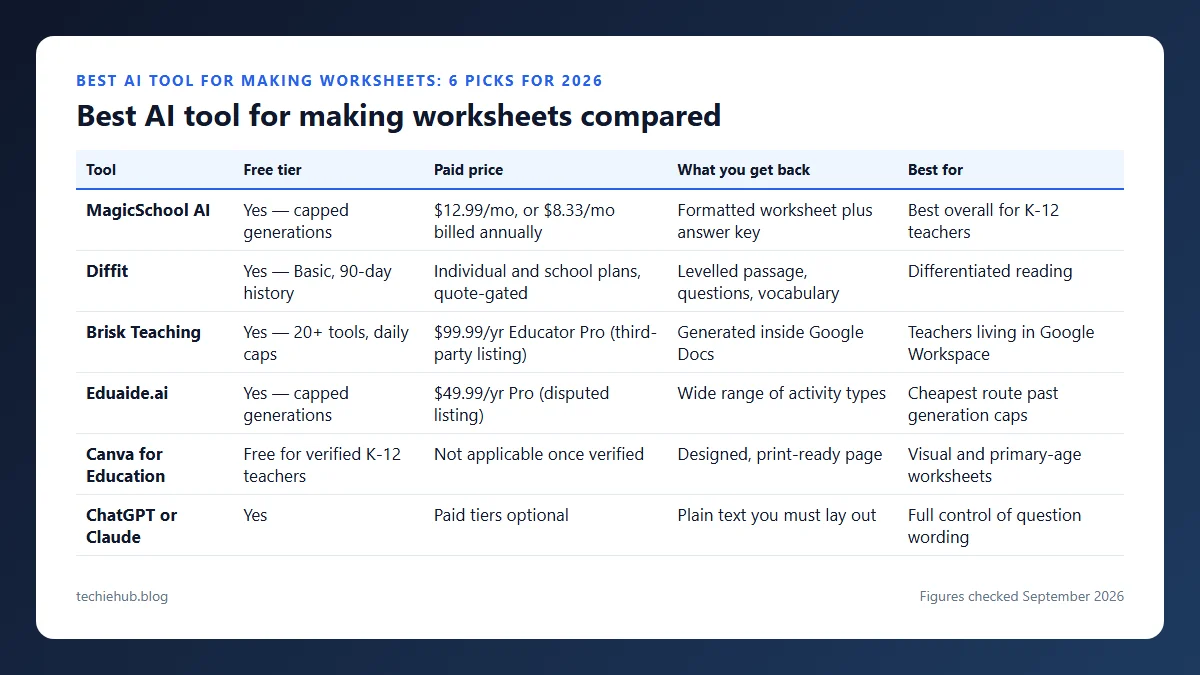
Best AI tool for making worksheets compared
| Tool | Free tier | Paid price | What you get back | Best for |
|---|---|---|---|---|
| MagicSchool AI | Yes — capped generations | $12.99/mo, or $8.33/mo billed annually | Formatted worksheet plus answer key | Best overall for K-12 teachers |
| Diffit | Yes — Basic, 90-day history | Individual and school plans, quote-gated | Levelled passage, questions, vocabulary | Differentiated reading |
| Brisk Teaching | Yes — 20+ tools, daily caps | $99.99/yr Educator Pro (third-party listing) | Generated inside Google Docs | Teachers living in Google Workspace |
| Eduaide.ai | Yes — capped generations | $49.99/yr Pro (disputed listing) | Wide range of activity types | Cheapest route past generation caps |
| Canva for Education | Free for verified K-12 teachers | Not applicable once verified | Designed, print-ready page | Visual and primary-age worksheets |
| ChatGPT or Claude | Yes | Paid tiers optional | Plain text you must lay out | Full control of question wording |


The six tools in detail
MagicSchool AI
MagicSchool AI is an education platform with a dedicated worksheet generator among 80-plus teacher tools. The free plan gives full tool access with capped generations; MagicSchool lists Plus at $12.99 per month, or $8.33 per month billed annually ($99.96 a year). For classroom use, see our guide to AI tools for teachers.
Diffit
Diffit is built for differentiated reading. Paste a topic, an article or a YouTube URL and it returns an adapted passage plus comprehension questions and vocabulary at several reading levels. The free Basic plan produces classroom-ready output you can print or export to PDF, with 90 days of resource history. For tools in other categories, see our roundup of generative AI tools.
Brisk Teaching
Brisk Teaching is a Chrome extension rather than a separate site, so it works inside Google Docs, Google Classroom and YouTube. Signing up starts a 14-day schools trial, then drops to a free tier of 20-plus tools with daily caps. Brisk publishes no pricing page — the URL 404s — so the $99.99-a-year Educator Pro figure comes from trackers.
Eduaide.ai
Resource generator covering many activity types on a capped free tier — one tracker says 15 generations a month, others a daily limit. Its site rate-limited us in September 2026, and trackers split between $49.99 a year and $5.99 a month for Pro, so treat both as unconfirmed.
Canva for Education
Canva for Education is the strongest option when the worksheet has to look designed rather than typed: real page layout, image placement and print bleed. Canva states that Canva for Education is free for verified K-12 teachers and their students, and includes the Magic Studio AI features.
ChatGPT or Claude
General-purpose assistants with no worksheet formatting of their own. They give the most control over question wording and difficulty, but you get plain text back and must lay it out in Docs or Canva.
What a paid tier costs per worksheet
Every paid plan here is an annual or monthly flat fee, so the only figure that decides whether upgrading is worth it is cost per sheet at your own output rate. Dividing each price by three realistic output rates settles the question faster than a feature list. Only the MagicSchool and Canva rows are vendor-published; Brisk and Eduaide are tracker-sourced.
| Plan, reduced to a monthly figure | 5 sheets a month | 20 sheets a month | 50 sheets a month |
|---|---|---|---|
| Canva for Education, free for verified K-12 teachers — $0 | $0.00 | $0.00 | $0.00 |
| Eduaide Pro, $49.99 a year ÷ 12 = $4.17 | $0.83 | $0.21 | $0.08 |
| MagicSchool Plus billed annually, $99.96 ÷ 12 = $8.33 | $1.67 | $0.42 | $0.17 |
| Brisk Educator Pro, $99.99 a year ÷ 12 = $8.33 | $1.67 | $0.42 | $0.17 |
| MagicSchool Plus billed monthly, $12.99 | $2.60 | $0.65 | $0.26 |
Two things fall out of the arithmetic. MagicSchool Plus and Brisk Educator Pro land three cents apart across a whole year — $99.96 against $99.99 — so price is not the deciding factor between them; where you work is. And paying MagicSchool monthly instead of annually costs $12.99 − $8.33 = $4.66 extra a month, a 56 percent premium, or $46.60 across a ten-month school year for exactly the same product.
Even the dearest row is $2.60 a sheet at five sheets a month, and eight cents at fifty. The real question is which free tier you outgrow. Diffit is absent: its plans are quote-gated, and we will not invent a figure for a cost-per-sheet column.
A reusable brief that gets a usable sheet on the first try
Most disappointing output is a briefing problem, not a model problem. Every tool here improves sharply when you supply the same six facts, so keep them in a note and paste them in each time:
- Grade and reading level — state both, because they often differ. “Grade 5 content at a Grade 3 reading level” is a normal request and most tools handle it.
- Source text — paste the passage or link it. A worksheet built from your text beats one built from the model’s memory of the topic.
- Question mix and count — for example, six multiple choice, four short answer, two extended response.
- What you are assessing — recall, inference or application. Without this you get recall questions every time.
- Answer key required — several tools only produce one on request.
- Accommodations — larger answer space, a word bank, or a simplified instruction line.
One more habit worth building: read the answer key before you print. These tools occasionally mark a defensible answer wrong, for the reasons set out in our explainer on why AI systems state wrong things confidently, and a key you have not checked is the fastest way to lose a class’s trust. If you also write longer classroom material, the same briefing discipline applies to AI writing tools, and our guide to AI tools for students covers the other side of the desk — including the AI content detectors teachers ask about most.
Which one should you actually start with?
Start free and stay there until a cap annoys you. For most teachers the sequence is: MagicSchool for general worksheets, Diffit when the same content needs three reading levels, and Canva for Education when the sheet is going on a wall or into a primary classroom. Brisk earns its place only if you already run everything through Google Docs, where it removes a tab switch. For the slide deck that goes with the sheet, our roundup of AI presentation makers covers the same job in a different format.
Skip the paid tier until you hit a limit twice in one week. Free plans among AI tools for teachers are unusually generous, and the upgrade buys volume rather than better questions. If you export a lot of finished sheets, our AI PDF tools guide covers merging and compressing them for distribution.
Frequently Asked Questions
What is the best AI tool for making worksheets?
MagicSchool AI is the best all-round choice, because a purpose-built worksheet generator sits inside a suite of 80-plus teacher tools and the free plan is usable on its own. Pick Diffit instead if you mainly need the same reading passage at several levels, and Canva for Education if the sheet has to be visually designed for print.
Who owns the copyright to AI-generated output?
In the United States, copyright requires human authorship. The US Copyright Office’s March 2023 registration guidance states that purely AI-generated material is not registrable, but that a human’s creative selection, arrangement or modification of that material can be. Applicants must disclose more than a de minimis amount of AI-generated content and describe the human contribution. In practice, a worksheet you have restructured, re-worded and sequenced yourself is on far safer ground than raw model output you pasted unchanged.
Can output be used commercially?
That depends on the vendor’s terms, not on copyright law, and the two questions are separate. Most education tools permit classroom use freely; selling the result on a marketplace such as Teachers Pay Teachers is governed by the tool’s own terms of service and by whether any images in the sheet are licensed for resale. Check the terms for the specific plan you are on before listing anything for sale, because free and paid tiers sometimes differ.
How do these compare on actual output quality?
The honest answer is that they differ more in format than in raw text quality, because several of them call the same underlying models. Diffit is the most consistent at levelled reading passages. MagicSchool produces the most complete worksheet structure without extra prompting. Canva wins on layout and loses on question generation. General assistants such as ChatGPT produce good questions in an unusable shape.
How much do AI worksheet makers cost?
All six have a free tier that is genuinely usable for occasional worksheets. Paid tiers exist mainly to remove generation caps: MagicSchool Plus is listed at $12.99 a month or $8.33 a month billed annually, Brisk Educator Pro at $99.99 a year and Eduaide Pro at $49.99 a year according to trackers; neither vendor publishes a verifiable price. Canva for Education is free for verified K-12 teachers.
Conclusion
MagicSchool AI is the best AI tool for making worksheets for most teachers, because it produces a complete document rather than a list of questions and its free tier is usable without a card. Diffit is the specialist worth adding for levelled reading, and Canva for Education handles anything that needs to look designed.
Whichever you pick, the worksheet is a draft until you have read the answer key. These tools remove the layout work and the blank page, not the professional judgement about whether the questions actually assess what you are teaching.
