


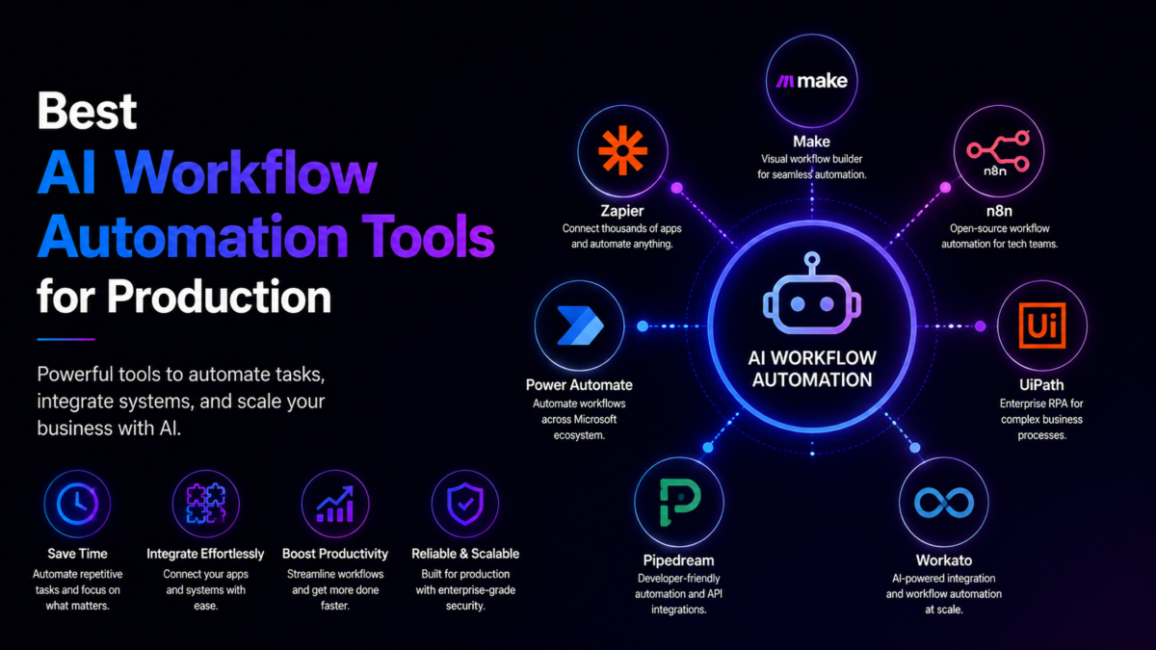
Every automation vendor now ships something it calls an agent, but the platforms that survive a full quarter in production are a much shorter list. AI workflow automation tools are platforms that orchestrate multi-step business processes by combining app integrations, model reasoning, tool calls and human approval steps into repeatable, auditable runs. That last word — auditable — is what separates this category from ordinary trigger-action automation.
This guide compares the leading options on the five things that decide whether a workflow reaches production and stays there: governance, observability, deterministic control, data sovereignty and time to value. Product claims, funding and analyst positions were re-checked on 2 October 2026.
| Quick answer: The strongest AI workflow automation platforms in 2026 are Workato for enterprise cross-app orchestration, Tray.ai for API-heavy engineering workflows, n8n for self-hosted technical control, Stack AI and Dust for AI-native pipelines with run tracing, LangGraph for code-level agent control, and Zapier for the widest app coverage. |
Table of Contents
What are AI workflow automation tools?
An AI workflow automation tool is an orchestration layer: it triggers on an event, moves data between systems, asks a model to reason over it, calls tools, pauses for a human when stakes are high, and records every step. Classic automation answers “when X happens, do Y.” An AI workflow answers “work out what Y should be, do it, and show your working.”
The plumbing underneath that shift standardised fast. Anthropic donated the Model Context Protocol to the Linux Foundation’s new Agentic AI Foundation on 9 December 2025, alongside Block’s goose and OpenAI’s AGENTS.md, with more than 10,000 published MCP servers already in circulation. Tool connectivity is now a shared standard rather than a per-vendor moat, which is precisely why platforms have stopped competing on connector counts and started competing on control. If you are still choosing between simple connectors, our guide to general-purpose AI automation tools covers the lighter end of the market; this comparison is about orchestration that has to hold up under audit.
What are the best AI workflow automation tools right now?
How we compare: we score platforms on governance depth (roles, environments, change history), observability (run traces you can actually read), deterministic control, deployment options including VPC and on-premises, and realistic time to value for the team that will own the workflows. We test on messy multi-system processes rather than happy-path demos, and we verify vendor claims against official documentation and analyst reports. Disclosure: some links on TechieHub are affiliate links. We earn a commission if you buy through them, at no extra cost to you, and it never changes our rankings.
Workato — enterprise cross-app orchestration
Workato remains the default for cross-department enterprise orchestration. It was named a Leader in the 2026 Gartner Magic Quadrant for iPaaS for the eighth consecutive time, and its Workato One release folded agentic capabilities into the same recipe, role and environment model that governs its integrations — plus a DeepConverse acquisition that pushed it into AI support automation. Strong governance, premium pricing.
Tray.ai — API-heavy engineering workflows
Tray.ai is the engineering-led alternative. Its Merlin Agent Builder added long-term and short-term agent memory, per-agent model selection, one-click enterprise data access and direct Slack or Teams deployment, and Tray.ai appears as a Pioneer in Gartner’s 2026 Emerging Market Quadrant for no-code agent builders. Pick it when workflows are API-heavy, JSON-shaped and need real debugging.
n8n — self-hosted technical control
n8n is the flexibility play, and 2026 was its breakout year: SAP took a stake in May 2026 at a $5.2 billion valuation, roughly double its October 2025 Series C mark, and is embedding n8n into Joule Studio. Self-hosting, source-available code and custom code nodes make it the pragmatic choice for technical operations teams who want data to stay put. Our head-to-head on n8n versus Zapier covers that trade-off in detail.
Stack AI and Dust — AI-native builders
Stack AI and Dust are AI-native builders where retrieval, tools and agents are first-class rather than bolted on. Stack AI in particular targets regulated buyers with SOC 2 Type II, ISO 27001, HIPAA and GDPR posture, US and EU data residency, VPC and on-premises deployment, and granular audit logging. Both expose run history you can inspect, which matters more than it sounds.
LangGraph — code-first, durable agents
LangGraph is the code-first option. LangChain shipped LangGraph 1.0 in October 2025 and 1.2 in May 2026, built around durable execution: state is checkpointed, so a restart mid-workflow resumes rather than restarts. Engineers get graph-level control over branching, retries and human interrupts, at the cost of a steeper ramp.
Zapier — widest app coverage via MCP
Zapier earns its place on reach. Its MCP endpoint exposes more than 30,000 actions across 9,000-plus apps to any compliant agent, turning the largest connector library in the market into a tool layer other systems can borrow. It is the fastest route to coverage, not the deepest route to governance — if that is your constraint, the stronger Zapier alternatives are worth a look.
How do the leading platforms compare?

| Platform | Category | Best for | Deployment control |
| Workato | Enterprise iPaaS | Cross-department orchestration | Cloud, private options |
| Tray.ai | Developer low-code | API-heavy, data-rich workflows | Cloud |
| n8n | Technical / source-available | Developer-owned flexibility | Cloud or self-hosted |
| Stack AI / Dust | AI-native builder | Observable AI pipelines | Cloud, VPC, on-premises |
| LangGraph | Developer framework | Durable, checkpointed agents | Your infrastructure |
| Zapier | Breadth-first automation | Wide SaaS coverage via MCP | Cloud |
Reading this table row by row is the wrong instinct. A developer framework will always lose on time to value and an SMB-friendly tool will always lose on governance, so comparing across categories manufactures false winners. Decide which row you belong in first, then compare only inside it.
What separates a production-grade platform from a demo?
The gap between pilot and production is now the industry’s defining number. Gartner predicts that over 40% of agentic AI projects will be cancelled by the end of 2027, citing escalating costs, unclear business value and inadequate risk controls — not model quality. McKinsey’s global survey points the same way: 88% of organisations now use AI in at least one function while only about a quarter are scaling an agentic system anywhere, and redesigning the workflow itself is the single change most associated with measurable earnings impact.

Scale arrived without the matching controls. Microsoft’s telemetry-based Cyber Pulse research found that more than 80% of Fortune 500 companies were running active AI agents built with low-code tooling, while observability, governance and identity remain the open frontier. Five criteria consistently predict which deployments survive: deterministic control over consequential steps, human-in-the-loop approval, auditability of failures and changes, data sovereignty through VPC or on-premises options, and honest time to value for whoever maintains the thing. Observability deserves extra weight because AI workflows drift in ways deterministic ones do not; without traces you cannot tell a model regression from a bad input.
How do you choose the right platform for your team?
Answer three questions in order. First, who maintains the workflow in six months? If the answer is an operations manager, a governed low-code platform wins even when a framework would be technically cleaner. If it is a platform engineer, LangGraph’s control is worth its ramp. Second, what is the blast radius? Workflows that issue refunds, change records of truth or email customers need approval gates and rollback; internal summarisation does not. Third, where must the data live? Regulatory answers cut the shortlist immediately, and eliminating early is far cheaper than migrating later. Teams weighing visual builders against code should also read our breakdown of low-code AI platforms.
Then run one genuinely ugly workflow as a proof of concept — the one with the inconsistent data and the awkward exception — and deliberately break it. The platform that shows you a clear trace, lets a human intervene and recovers cleanly is worth more than the one with the better builder.
What does a real deployment look like?
Consider the automation lead Whitfield, operations lead at a 140-person commercial insurance brokerage — a composite drawn from the deployment pattern we see most often. His team spent roughly 15 hours a week triaging inbound renewal requests: pulling the policy record, checking three carrier portals, drafting a quote summary and routing it to a broker.
The workflow was built in n8n, self-hosted so client data never left the brokerage’s infrastructure. It extracts fields from the inbound email, queries the policy database, calls a model to draft the quote summary, then stops at a mandatory approval node: no quote reaches a client without a licensed broker clicking approve. Every run is logged with inputs, model output and the approver’s name.
After two months, triage time fell to roughly four hours a week — and, more importantly for the compliance officer, every quote carried a complete audit trail. The workflow was not more autonomous than the alternatives the automation lead tested. It was more inspectable, and that is what got it signed off.
Frequently Asked Questions
What is the best AI workflow automation tool in 2026?
There is no single winner, because the categories serve different owners. Workato leads enterprise cross-app orchestration, Tray.ai suits API-heavy engineering work, n8n offers self-hosted flexibility, Stack AI and Dust cover AI-native pipelines with tracing, and LangGraph gives engineers code-level control over durable agents.
How are AI workflow automation tools different from Zapier?
Zapier excels at breadth and speed, connecting more than 9,000 apps and exposing over 30,000 actions to agents through its MCP endpoint. Dedicated workflow platforms trade some of that breadth for production controls: role-based governance, environments, readable run traces, approval gates and deployment options such as VPC or on-premises hosting.
Why do so many AI workflow projects fail?
Gartner forecasts that over 40% of agentic AI projects will be cancelled by the end of 2027, blaming escalating costs, unclear business value and inadequate risk controls rather than model capability. Projects fail when nobody defined the measurable outcome, when runs cannot be traced, and when governance was treated as a post-launch task.
What does observability mean in an AI workflow?
Observability is your ability to reconstruct what a workflow did: the inputs it received, the reasoning step it took, the tools it called, where it failed and who changed it. It matters because model behaviour drifts over time, so without stored traces you cannot distinguish a genuine regression from an unusual input.
Do I need developers to use AI workflow automation tools?
Not always. Workato, Zapier and Stack AI are built for business and operations owners, though technical skill still helps. n8n sits in the middle with visual design plus custom code nodes, while Tray.ai and LangGraph assume engineering capability. Choose based on who will maintain the workflow, not who builds the first version.
Can these platforms keep sensitive data on-premises?
Several can. n8n supports full self-hosting, Stack AI offers VPC and on-premises deployment with US and EU data residency alongside SOC 2 Type II and ISO 27001 posture, and LangGraph runs entirely on your own infrastructure. Confirm current certifications directly with each vendor before committing regulated data.
How much do AI workflow automation platforms cost?
Half of this list will not tell you until you take a call. Workato, Tray.ai, Stack AI and Dust price by quote, which in practice means annual contracts scoped to connectors, environments and volume — budget enterprise software, not a subscription. The three that publish are the ones you can evaluate without a sales cycle: n8n Cloud starts at €20 (about $23) a month billed annually for 2,500 executions, rising to €50 (about $56) for 10,000, with the self-hosted Community edition free, Zapier Professional at $29.99 a month for 750 tasks, or $19.99 billed annually, and LangGraph is an open-source framework where the cost is your infrastructure plus model tokens rather than a licence.
Two costs sit outside every price list. Model spend is billed separately on any platform running agents, and it scales with steps rather than seats. And the engineering time to reach production — governance, error handling, observability — routinely exceeds the licence in year one. Price the deployment, not the plan.
What are the best alternatives to Workato for workflow automation?
n8n if you want self-hosting, Tray.ai if the work is API-heavy, and Zapier if breadth matters more than governance. Workato is priced by quote and scoped to connectors, environments and volume, which is exactly why teams look for alternatives. n8n is the closest like-for-like swap for a technical team: source-available, self-hostable so data never leaves your infrastructure, and published pricing from €20 (about $23) a month against Workato’s sales cycle. Tray.ai suits engineering teams who live in APIs and want a developer-grade builder. Zapier wins when the constraint is app coverage rather than control, with more than 9,000 apps and an MCP endpoint for agents. Stack AI and Dust are the AI-native options when the workflow is mostly model calls. Choose on deployment control first: if client data cannot leave your network, that single requirement removes most of the list before price enters the conversation.
Conclusion
The best AI workflow automation tool is the one that matches your maintainer, your blast radius and your data rules — in that order. The 2026 evidence is consistent: connectivity has been commoditised by MCP, capability is no longer the bottleneck, and the projects that get cancelled are the ones nobody could measure or trace. Choose for inspectability, build the approval gates before you need them, and instrument every run from day one. Do that, and an AI workflow becomes an operational asset instead of an audit finding.
