


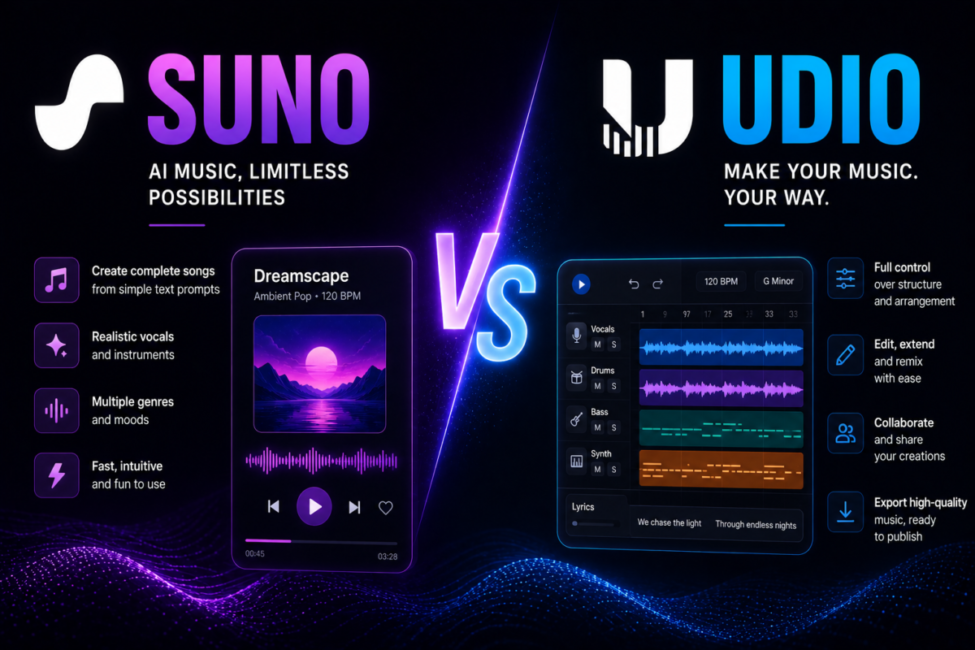
Two names dominate every conversation about turning a text prompt into a finished song. Suno and Udio both launched in 2023, both write lyrics, sing them and mix the result in about a minute, and both spent 2025 being sued by the world’s largest record labels. What changed by mid-2026 is that they are no longer competing on the same terms: one raised hundreds of millions and shipped a full production suite, while the other traded its independence for a label licence and switched off downloads. That single divergence now drives the decision.
How we compare: we assess both on the same three job types – a vocal pop track, a jazz quartet instrumental and a cinematic cue – and verify pricing, export rights and licence terms against the vendors’ own published pages rather than press coverage, last on 6 October 2026. Disclosure: this page contains affiliate links, and we may earn a commission if you subscribe, at no extra cost to you.
| Quick answer: Suno is the practical choice for almost everyone in 2026 – stronger vocals, a genuine DAW, and tracks you can download and release. Udio still edges it on instrumental fidelity and granular editing, but exports remain disabled during its label-licensing transition, so treat it as a studio sketchpad until downloads return. |

Table of Contents
Suno vs Udio: which one should you pay for?
The case for Suno
Suno, for most people, and the reason has less to do with sound than with plumbing. Suno spent 2026 becoming a production environment rather than a novelty. Version 5.5 arrived in March with Voices, a cloning feature that builds a vocal fingerprint from about a minute of dry singing, alongside Custom Models fine-tuned on your own catalogue and Suno Studio, a multitrack editor that pushes stems and MIDI straight into Ableton Live or Logic Pro. In June the company raised over $400 million at a $5.4 billion valuation, having passed two million paying subscribers earlier in the year.
The case for Udio
Udio moved in the opposite direction. After settling with Universal Music Group and Warner Music Group it became a licensed partner rather than a challenger. That is a far cleaner legal position, and its audio engine is arguably still the more refined of the two on acoustic and electronic material. The catch is that it currently cannot hand you the file. For the wider category, start with our pillar on generative AI tools and our ranking of the best AI music generator platforms.
How much do they cost, and what do you get?
Headline pricing — near identical
Headline prices are nearly identical, which pushes the real differences one level down. Suno’s official pricing page lists a free tier with 50 credits that renew daily and no commercial rights, Pro at $10 a month (or $8 billed annually) for 2,500 monthly credits, and Premier at $30 a month ($24 annually) for 10,000 credits plus Suno Studio access. Udio mirrors the ladder almost exactly: 100 free credits a month, Standard at $10 for 2,400 credits, and Pro at $30 for 6,000, with a comparable 20% annual discount.
Credit economics — where they actually differ
Credit economics are where they part. Udio charges roughly one credit for a short generation and more for a full-length track, and unused credits expire each billing cycle with no rollover. Suno’s larger allowance and higher first-take success rate mean fewer regenerations per usable song, so the effective cost of a finished, releasable track usually lands lower even when the subscription costs the same.
| Factor | Suno | Udio |
| Current model | v5.5, March 2026 | v1.5 |
| Entry paid tier | Pro, $10/mo, 2,500 credits | Standard, $10/mo, 2,400 credits |
| Power tier | Premier, $30/mo, 10,000 credits | Pro, $30/mo, 6,000 credits |
| Vocals | Best diction and expression | Capable, prone to artifacts |
| Audio fidelity | Very good | 48 kHz, cleanest separation |
| Editing | Studio DAW, stems, MIDI | Inpainting, audio-to-audio remix |
| Downloads | Yes, on paid plans | Disabled since October 2025 |

Which one sounds better, and at what?
Split the question in two, because the answer flips. On vocals, Suno leads clearly: diction is sharper, it sings the lyrics you actually wrote rather than an approximation, and its phrasing carries breath and dynamics that read as human. It is also the more dependable performer across pop, hip-hop, rock and cinematic material.
On instrumental fidelity, Udio takes it. Its 48 kHz stereo output gives cleaner instrument separation and more convincing room sound, and it handles jazz, classical, ambient and detailed electronic production with a nuance Suno tends to flatten. Udio’s weakness is the mirror image: vocals can drift into a metallic timbre, mispronounce words or degrade into near-gibberish on longer takes. The working rule is simple – Suno for songs with singing, Udio for music without it. If your project needs narration rather than melody, our guides to the best AI voice generator and the best free text to speech AI cover spoken audio instead.

Can you download and release what you make?
This is the difference that decides most subscriptions. Udio’s own help centre confirms that downloading of audio, video and stems has been disabled as part of the partnership that took effect on 29 October 2025. Paid tiers are not exempt. After the backlash Udio opened a brief 48-hour window for users to retrieve their libraries, then closed it again.
The result is a walled garden: you can generate and stream your tracks on Udio, but you cannot drop them into a video, upload them to Spotify or hand them to a client. The co-licensed platform meant to restore exports was announced for 2026 and had not shipped as of July. Suno still exports normally – free-tier songs are playable and shareable only, while paid plans download with monthly caps, and stem export stays unlimited inside Suno Studio.
What do the label settlements mean for commercial use?
What each platform grants you
Both platforms grant commercial rights on paid plans and restrict free tiers to personal use, but the legal backdrop is uneven. Warner settled with Suno in November 2025 and signed a licensing deal that also transferred the concert-data service Songkick. Sony Music and Universal did not settle: their case continues in Boston, and in May 2026 they moved to expand it from 560 recordings to more than 61,000, a change that would push statutory damages into the billions. Udio, having settled with both UMG and Warner, carries less litigation risk but pays for it with the export freeze.
Who owns an AI-generated track
Ownership is a separate question. The U.S. Copyright Office registration guidance holds that only human-authored contributions are protectable, so a track generated entirely from a prompt cannot be registered as yours. Volume matters too: Deezer reported that roughly 90,000 AI-generated tracks a day now exceed half of all new uploads, yet they draw only 1-3% of streams. Releasing AI music is easy; being heard is not.
How one creator would choose: an illustrative test
Take a documentary editor at a small production studio who needs nine minutes of score for a film about a closing shipyard: two ambient passages, a restrained string cue and one vocal piece for the credits. Library music felt generic and a composer quoted more than the segment’s entire budget, so both platforms get trialled on the same brief over a fortnight.
Udio won the listening test outright. Its ambient beds had air and depth, and the string cue needed only two attempts. Then comes the export, which fails – the material existed only inside Udio’s player, which is useless in a Premiere timeline. The score was rebuilt in Suno on the Premier plan, stems pulled into the editor through Suno Studio, and the credits vocal nudged until the lyrics sat cleanly against the picture. The film delivered on time for $30. The verdict was blunt: Udio made the better music, Suno made the music that could actually be used.
This example is a composite of the creator tool tests we see most often, not a single client account; the figures are typical rather than measured from one engagement.
Frequently Asked Questions
Is Suno or Udio better for beginners?
Suno. It turns a one-line prompt into a polished, downloadable song in under a minute, with reliable vocals and a large community sharing prompt techniques. Udio’s block-by-block workflow rewards patience but demands more effort, and its paused exports frustrate newcomers who expect to use what they create.
Why can’t I download my songs from Udio?
Udio disabled audio, video and stem downloads on 29 October 2025 as part of its Universal Music Group partnership, and the restriction applies to paid plans too. The company says exports will return with its co-licensed platform, and it has since added licensing deals with Warner, Merlin and Kobalt, but downloads were still switched off through September 2026 and no firm date has been confirmed. A 48-hour download window in early November 2025 was the only exception.
Do the two platforms cost the same?
Almost. Both charge about $10 monthly for their entry commercial tier and $30 for the power tier, with roughly 20% off annual billing. Suno grants more monthly credits and typically needs fewer regenerations, so the real cost per finished, usable track tends to land lower.
Can I legally sell music made with these tools?
Paid plans on both platforms grant commercial rights, while free tiers are personal use only. However, a purely AI-generated track cannot be registered for copyright in the United States without meaningful human authorship, and Sony’s litigation against Suno remains unresolved, so read the current terms first.
Which handles jazz, classical and ambient better?
Udio, comfortably. Its 48 kHz output delivers cleaner instrument separation and more believable acoustic space, which matters most in sparse, dynamic arrangements. Suno can drift on complex harmony and technical genres. Just remember you currently cannot export the results, so treat Udio as an audition space.
Should I subscribe to both?
Not right now. The old workflow of drafting in Suno and refining in Udio depended on exporting from both. With Udio’s downloads paused, paying twice buys material you cannot use. Subscribe to Suno, keep a free Udio account, and revisit the question when exports return.
Can you release AI music on Spotify and YouTube?
Yes, provided you generated it on a paid plan — the free tiers are personal use only and uploading that output commercially breaches the terms before any platform rule applies. Streaming services do not ban AI-generated music as a category; distributors will accept it if you hold the rights. What they do enforce is everything around it: rules against mass-uploaded filler, against impersonating a real artist’s voice or name, and increasingly a requirement to disclose synthetic content. YouTube adds a second layer, since Content ID can flag a track that sits too close to an existing recording regardless of how it was made. The practical rule is unglamorous — generate on a paid tier, keep the receipt, do not clone a recognisable artist, and disclose where asked. For voiceover rather than music, see our comparison of ElevenLabs alternatives.
Conclusion
Both remain the best text-to-song systems available, but in 2026 they answer different questions. Udio is the better-sounding instrument and the cleaner legal partner, held back by a walled garden that makes it unusable for anyone shipping work. Suno is the complete production stack: better vocals, a real DAW, stems, MIDI, and files you can hand to a client today. Unless you are purely experimenting or waiting out the licensing transition, pay for Suno and keep a free Udio account open for the day exports return. Run one prompt through both before you commit, and let your own ears settle the rest. For a wider comparison that works out the cost per finished hour of audio, see our guide to the best AI voice generator.
