



| Quick answer |
|---|
| The best AI tools for interior design in 2026 are Planner 5D for floor plans and renders at $19.99 a month, REimagine Home for virtual staging from $14, and Coohom for production 3D work at $29. Homestyler undercuts everything from $6.80 with a free unlimited-1K tier, and Spacely AI gives 40 free credits with a commercial licence. |
How we compare: tools are judged on what job they actually do, the published entry price, and whether a free tier exists that is usable rather than decorative. Prices were re-read off vendor pricing pages on 20 November 2026 and change often, so check before you subscribe. Two exceptions: Coohom showed us only local-currency prices, so its USD figures are from September 2026, and Midjourney’s plan page blocks automated reads, so its prices are as published in September 2026. We have not rendered the same room in all six to compare output.
Table of Contents
The three jobs these tools do — pick the job first
Almost every list in this category ranks these products as if they were interchangeable. They are not. There are three distinct jobs, and a tool that is excellent at one is usually poor at the others.
- Restyling a photo. You upload a picture of a real room and the model redecorates it while keeping the walls and windows where they are. This is virtual staging. REimagine Home and Spacely AI do this.
- Building and rendering a model. You draw a floor plan, place real furniture with real dimensions, and produce a 3D rendering you can quote and build from. Planner 5D, Coohom and Homestyler do this.
- Generating a look. You describe a mood and get an image that has never existed and cannot be built. Midjourney does this, and it is the correct tool for a mood board and the wrong one for a client presentation.
If you are an estate agent staging an empty listing, job one is all you need. If you are a designer producing a specification, only job two gives you dimensions. Buying the wrong category is the most expensive mistake in this market, and it costs more than the subscription. For tools by category, see our roundup of generative AI tools.
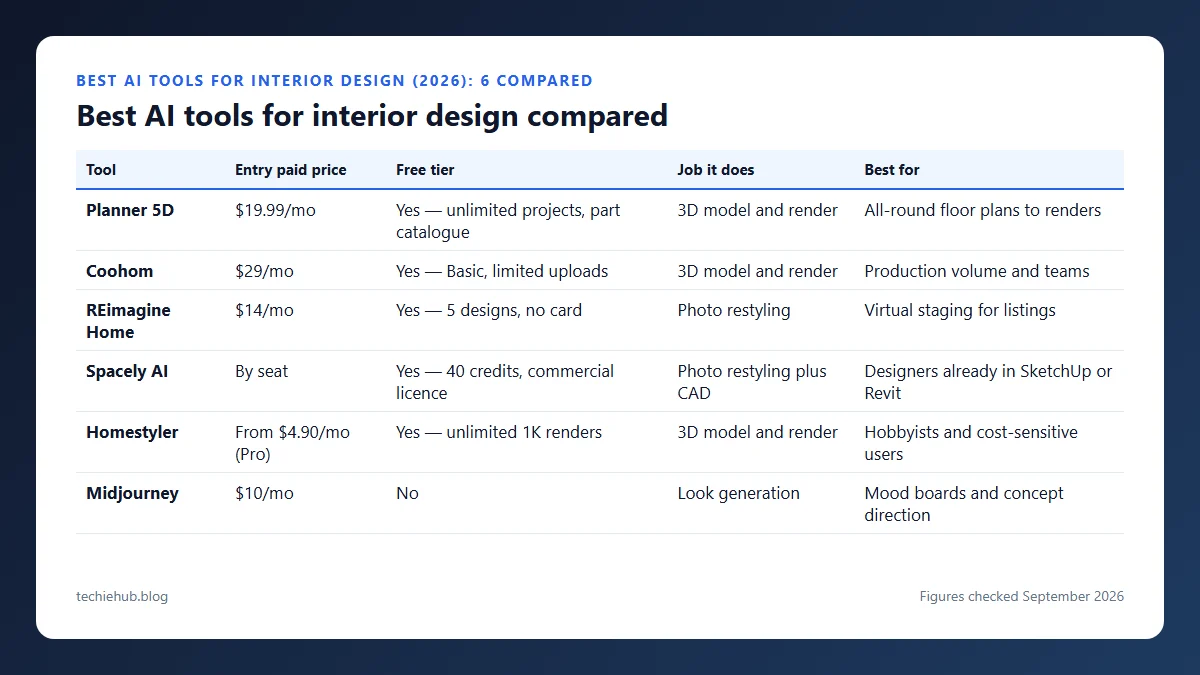
Best AI tools for interior design compared
| Tool | Entry paid price | Free tier | Job it does | Best for |
|---|---|---|---|---|
| Planner 5D | $19.99/mo | Yes — unlimited projects, part catalogue | 3D model and render | All-round floor plans to renders |
| Coohom | $29/mo | Yes — Basic, limited uploads | 3D model and render | Production volume and teams |
| REimagine Home | $14/mo | Yes — 5 designs, no card | Photo restyling | Virtual staging for listings |
| Spacely AI | By seat | Yes — 40 credits, commercial licence | Photo restyling plus CAD | Designers already in SketchUp or Revit |
| Homestyler | From $6.80/mo (Pro+) | Yes — unlimited 1K renders | 3D model and render | Hobbyists and cost-sensitive users |
| Midjourney | $10/mo | No | Look generation | Mood boards and concept direction |
The tools in detail
Planner 5D
Floor-plan-first tool, from Planner 5D. The free tier allows unlimited projects with about half the furniture catalogue; Premium is $19.99 a month or $59.99 a year and adds the full 10,000-plus item catalogue, AI floor plan recognition and standard renders. Professional is $49.99 a month, or $399.99 a year, with unlimited 4K renders, CAD export, 360-degree walkthroughs and a price estimator. For room and remodel planning, see our guide to AI kitchen design tools.
Coohom
Production 3D rendering platform. Coohom Basic is free with limited model and texture uploads; Pro is $29 a month with a seven-day trial; Elite is $69 a month for teams working at volume. The vendor advertises photo-realistic renders in under a minute and 100-plus branded furniture collections on paid tiers, and discounts yearly billing heavily — up to 75% off, which changes the Pro-versus-Elite maths if you can commit.
REimagine Home
Virtual staging and redecoration from a photograph with REimagine Home. Five free designs with no card, then Essential at $14 a month for 30 credits, Pro at $49 for 200 credits, Advanced at $74 for 400 and Agency at $99 for 900. Conversational editing and real-product discovery start at the Pro tier.
Spacely AI
Spacely AI is a CAD-adjacent redesign tool with SketchUp, Revit, AutoCAD and Rhino integrations. The free plan gives 40 trial credits, watermark-free output and a commercial licence. Paid tiers are sold by seat rather than by a headline monthly price, and credits can be topped up outright: $9 for 200, $35 for 1,000 or $150 for 5,000 — $0.045 down to $0.03 a credit, with no expiry. Students on an academic email get the Studio feature set plus 1,500 monthly credits for $30.
Homestyler
Long-standing floor-plan and rendering tool aimed at hobbyists and estate agents, and the cheapest real option here. Homestyler Basic is free with unlimited 1K rendering and a 100,000-model library; Pro+ starts from $6.80 a month with 180 AI credits, Master+ from $11.80 with 380 credits, and Team from $19.90 a seat with 500 credits per account. At that price the question is not whether it is worth trying but whether the render quality clears your client’s bar.
Midjourney
Not an interior design tool at all, but the fastest way to produce mood boards and style directions. Basic is $10 a month, Standard $30, Pro $60 and Mega $120, with annual billing about 20 percent cheaper. There is no free plan. Stealth mode, which keeps your generations out of the public gallery, starts at the Pro tier.
The credit-pricing trap in virtual staging
The headline monthly price on a staging tool tells you almost nothing, because you are really buying credits. REimagine Home sells four tiers spanning $14 to $99 a month, carrying 30, 200, 400 and 900 credits respectively — so the cost per credit falls by roughly an order of magnitude between the bottom and the top. One design costs a credit; a design with real-product discovery costs two. Third-party trackers disagree on the two middle prices, so confirm them in the checkout rather than in a comparison table.
That matters because restyling is iterative. A room rarely lands on the first generation, and a listing usually needs several rooms. Work out your real monthly volume in rooms, multiply by the number of attempts you honestly expect, and price the tier that covers it. A $14 plan that runs out on the eighteenth of the month is a $49 plan with extra friction.
Where AI still fails in interior design
Two failures show up in every tool here. The first is furniture that does not exist: photo restyling models invent plausible pieces you cannot source, which is useless the moment a client asks where to buy the chair. REimagine Home addresses this with real-product discovery on its Pro tier and above; most competitors do not.
The second is geometry drift. Restyling models quietly move a doorway, change a ceiling height or dissolve a radiator. For a mood board that is harmless. For a specification it is a defect, and it is the reason 3D rendering from a model you built yourself has not been replaced. If you want more background on the underlying image models, our comparison of Midjourney and DALL-E covers how they differ, and our guide to the best AI tools for designers covers the wider design stack.
How to redesign a room with AI in four steps
To redesign a room with AI, photograph it, pick the tool that matches the job, generate a few styles and check the result against real measurements. The steps below work with any tool in this list.
- Take a straight-on photo. Shoot the room in daylight from a corner, at chest height, with the floor and ceiling line both in frame.
- Choose the job. Use a photo restyler for a new look, a 3D planner when walls or furniture move, and an image generator only for mood boards.
- Generate several versions. Run three to five styles and keep the one where windows, doors and the floor stay in the right place.
- Check it against the real room. Measure the furniture the AI drew before buying anything, because restylers invent pieces and ignore true sizes.
Quick free options: Interior AI, RoomGPT and Foyr Neo
Three more names appear on most 2026 roundups. They are quick idea tools rather than design software: upload a photo, pick a style, get a picture back.
| Tool | What it does | Use it for |
|---|---|---|
| Interior AI | Restyles and virtually stages room photos | Fast listing photos and style ideas |
| RoomGPT | Turns one photo into a new style in seconds | Trying looks before a real plan |
| Foyr Neo | Browser-based floor plans and 3D renders for designers | Client presentations without CAD |
We could not read current plan prices for these three on 20 November 2026, so none are quoted here. Check each site before you pay.
Frequently Asked Questions
What are the best AI tools for interior design?
Planner 5D is the best all-round choice at $19.99 a month, REimagine Home is the best virtual staging tool from $14, and Coohom is the strongest production renderer at $29. Homestyler and Spacely AI both have genuine free tiers if you want to test the workflow before paying anything.
Who owns the copyright to AI-generated output?
In the United States, the Copyright Office has been consistent since its 2023 registration guidance and its January 2025 report on copyrightability: copyright requires human authorship, and prompts alone do not supply it. A purely AI-generated render is generally not registrable. Your own floor plan, your photograph of the room and your edits are human work and can be protected. Rules differ by jurisdiction, so take local advice before you build a business on exclusivity.
Can output be used commercially?
Usually yes, but the permission comes from the vendor’s terms, not from copyright. Spacely AI states a commercial licence even on its free plan. REimagine Home removes watermarks from the Essential tier upward. Midjourney sells paid subscriptions with commercial usage terms. Commercial use and exclusive ownership are two different things — you can be allowed to sell an image that nobody, including you, can stop a competitor from reproducing.
How do these compare on actual output quality?
Quality splits by job rather than by rank. Photo-in, photo-out tools such as REimagine Home and Spacely AI hold the room geometry and change the styling, which is what estate agents and stagers need. Model-based tools such as Planner 5D and Coohom render from a 3D scene you built, so the result is dimensionally accurate and can be quoted from. Midjourney produces the most striking images and the least buildable ones.
How much do AI tools for interior design cost?
Entry paid tiers on 20 November 2026: Homestyler from $6.80 a month, Midjourney $10, REimagine Home $14, Planner 5D $19.99 and Coohom $29. Professional tiers run to $49.99 for Planner 5D ($399.99 a year), $69 for Coohom Elite and $99 for the REimagine Home Agency plan. Homestyler, Spacely AI, Coohom and Planner 5D all offer a free tier; Midjourney does not. Spacely also sells credits outright from $9 for 200.
Can AI design a room from a photo?
Yes. Photo restylers such as REimagine Home, Spacely AI and Interior AI take one photo of a real room and return it in a new style in under a minute. They keep the walls and windows but invent furniture, so treat the result as a picture of an idea, not a shopping list or a floor plan.
Conclusion
Choose by job, then by volume. Planner 5D at $19.99 a month is the sensible default for anyone who needs a floor plan and a render from the same file. REimagine Home from $14 is the right tool for staging photographs of real rooms, priced by credits rather than by seats. Coohom at $29 earns its premium once rendering is a daily production task rather than an occasional one.
Test on the free tiers before you commit — Planner 5D, Coohom, Homestyler and Spacely AI all have one, and 40 free credits will tell you more about fit than any comparison table, including this one. For image generation beyond room design, see our roundup of the best AI tools for generating images.
