


| Quick answer |
|---|
| The best AI tools for building websites 2026 split in two. For marketing sites, Framer gives the best design output and Hostinger’s AI Builder the lowest price, from $2.99 a month. For sites that are really applications, Lovable and v0 build working code from a prompt. |
How this comparison works: prices were checked against vendor pages and pricing round-ups in August 2026, and every vendor page was re-checked on 12 September 2026. Prices are quoted as listed, with monthly and annual figures separated where they differ. Every price was re-checked against the vendor’s own pricing page in September 2026, and figures available only from third-party trackers are marked as reported. We did not run a paid build on every platform, so the credit-burn figures below are the vendors’ published metering rules rather than our own consumption data. Tools are judged on what you own at the end, how billing behaves as you iterate, and whether the output is exportable.
Table of Contents
The split that decides everything
This category is now two categories, and picking from the wrong one is the expensive mistake. Traditional builders — Wix, Framer, Squarespace, Hostinger, 10Web — generate marketing pages and charge a flat monthly fee. Prompt-to-app builders — Lovable, v0, Bolt.new — generate working software and charge by usage, sitting somewhere between no-code and real development.
If your site is pages, a flat-rate builder is cheaper and finishes faster. If your site needs accounts, a database or a dashboard, no amount of prompting will get a page builder there. Decide which one you are building before you compare prices, because the two groups are not substitutes.
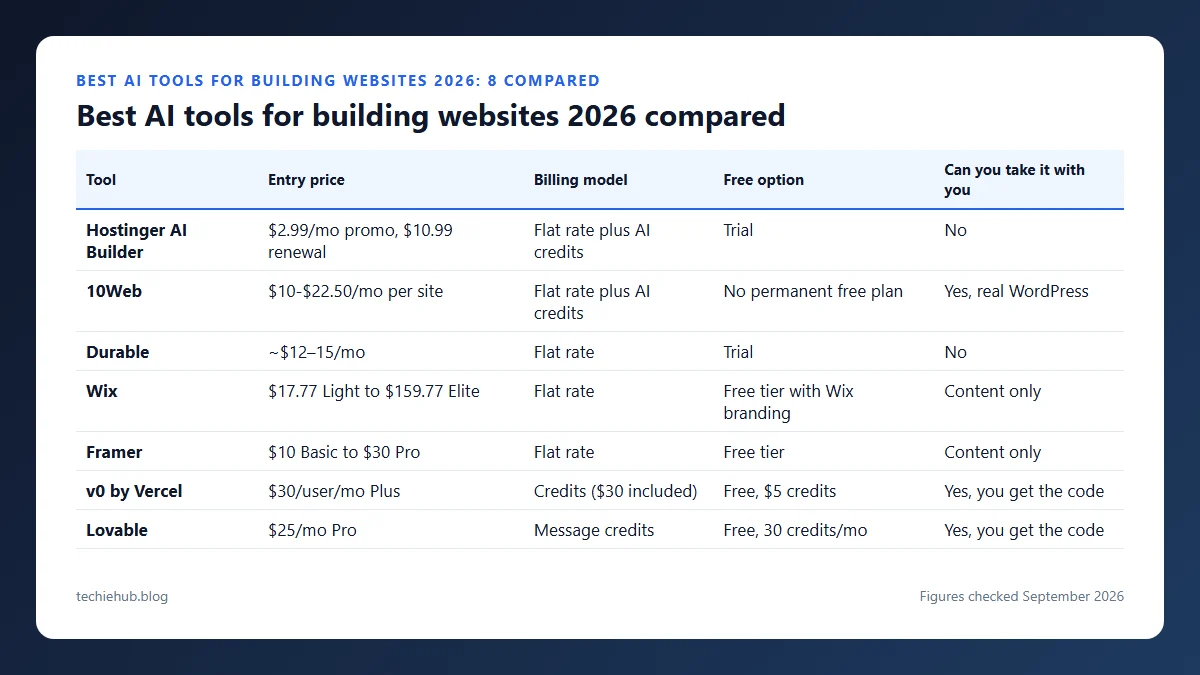
Best AI tools for building websites 2026 compared
| Tool | Entry price | Billing model | Free option | Can you take it with you |
|---|---|---|---|---|
| Hostinger AI Builder | $2.99/mo promo, $10.99 renewal | Flat rate plus AI credits | Trial | No |
| 10Web | $10-$22.50/mo per site | Flat rate plus AI credits | No permanent free plan | Yes, real WordPress |
| Durable | ~$12–15/mo | Flat rate | Trial | No |
| Wix | $17.77 Light to $159.77 Elite | Flat rate | Free tier with Wix branding | Content only |
| Framer | $10 Basic to $30 Pro | Flat rate | Free tier | Content only |
| v0 by Vercel | $30/user/mo Plus | Credits ($30 included) | Free, $5 credits | Yes, you get the code |
| Lovable | $25/mo Pro | Message credits | Free, 30 credits/mo | Yes, you get the code |
| Bolt.new | $25/mo Pro | Tokens, 10M+/mo, 1-month rollover | Free, 1M tokens/mo | Yes, you get the code |

The credit trap
Flat-rate builders bill the same whether you rebuild the homepage once or forty times. Usage-billed tools do not. Lovable charges per message credit, so every “actually, make the hero smaller” costs something. Bolt.new charges per token, which means the same edit gets more expensive as the codebase grows — a genuinely counter-intuitive curve, because the later work is when you iterate most. For tools in other categories, see our roundup of generative AI tools.
Two details in the small print matter more than the headline number. First, credits expire: Lovable’s documentation states that monthly plan credits expire two months after they are issued, annual plan credits one month after the annual period ends, and separately purchased top-up credits after twelve months. Buying a big block up front to smooth out a busy month therefore does not work the way it does with prepaid hosting. Second, the free daily allowances that look generous are use-it-or-lose-it — Lovable’s five daily build credits expire at the end of each day, and v0’s free plan is additionally capped at seven messages a day regardless of credit balance.
The practical consequence is that a stop-start build costs more than the same work done in concentrated sessions. If you can only touch the project for twenty minutes a week, the flat-rate group is not just more predictable, it is genuinely cheaper.
The three headline prices converge near $25 to $30 a month, so they look interchangeable. They are not. Treat the Pro tier of any prompt-to-app tool as a floor and assume a heavy build month costs a multiple of it. If predictability matters more than capability, that alone points you at the flat-rate group.
The eight tools, one by one
Framer
Design-led marketing sites with an AI wireframer and a large template library. On the Framer pricing page, checked 6 September 2026, monthly billing lists Basic at $10 and Pro at $30, with a free tier that gives you a Framer subdomain, 1 GB of bandwidth and 500 AI credits to try. Annual billing is offered at a lower effective rate. Output looks like a design studio built it, which is the main reason to pick it over Wix. For turning these visuals into on-brand designs, see our guide to AI design agents.
Wix
The mainstream all-rounder for non-technical owners who need a store, a blog and bookings in one place. Wix lists annual billing at $17.77 for Light, $29.77 for Core, $39.77 for Business and $159.77 for Business Elite, with a free tier that carries Wix branding.
Hostinger AI Builder (formerly Horizons)
Hostinger has merged Horizons into its AI Builder. Promotional pricing runs $2.99 a month for Premium with 5 AI credits, $3.99 for Unlimited with 15, and $7.99 for Cloud Startup — but those renew at $10.99, $16.99 and $25.99 — budget on renewal. Still the cheapest credible entry point; expect fewer design controls in return.
Durable
Business-in-a-box rather than a pure site builder, listed at roughly $12 to $15 per month. Bundles a CRM and invoicing alongside the site, which suits a one-person service business more than a content site.
10Web
WordPress-native, so what you end up with is a real WordPress install on Google Cloud hosting rather than a proprietary format. 10Web lists AI Starter at $10 a month for one site with 100 AI credits, AI Premium at $15 for two sites and 200 credits, and AI Ultimate at $22.50 for four sites and 300 credits, with 50% off yearly billing and no permanent free plan. The allowance is credits, not words.
Lovable
Prompt-to-app rather than prompt-to-page: it builds the working product behind the site. The Lovable pricing page and its subscription docs, checked 6 September 2026, list Pro from $25 a month and Business from $50, both starting at 100 credits and scalable up to 10,000 credits a month on higher tiers. The free plan is metered daily rather than monthly: five build credits a day, capped at 30 in a calendar month, and those daily grants do not roll over. Plans are priced by credits rather than seats, so a workspace can hold unlimited members on any tier.
v0 by Vercel
Vercel restructured these tiers, so older round-ups are out of date. The v0 pricing page, checked 6 September 2026, lists Free with a seven-message daily limit and $5 of one-time credits for new users (re-read on 11 October 2026), Plus at $30 per user per month with $30 of included credits, and Business at $100 per user per month. Paid tiers add $2 of free credits each day you log in and pool credits across a team; extra credits can be bought on any plan. Strongest when the site is really a React front end you intend to keep developing.
Bolt.new
Bolt.new lists Pro at $25 a month and Teams at $30 per member, billed by token rather than credit, starting at 10 million tokens a month; unused tokens roll over for one extra month only, and the free plan gives 1 million a month against a 300,000 daily ceiling. Token billing means the cost climbs as the codebase grows, which is the opposite of how flat-rate builders behave.
What AI still will not do for your site
Every tool here produces a plausible layout in under a minute. None of them produces a reason for anyone to visit. The generated copy is generic by construction, the stock imagery is shared with thousands of other sites, and the web design is whatever the template dictated. That is fine as a starting point and fatal as a finished product.
Budget your time accordingly: minutes on generation, days on the copy, images and page speed. If the site needs to be found, our guides to generative engine optimization and ranking in Google AI Overviews cover what has to be true of the pages themselves. For a WordPress build specifically, the best AI chatbot for WordPress and AI blog writing tools cover the layers that sit on top.
Frequently Asked Questions
What are the best AI tools for building websites?
Framer for design-led marketing sites, Wix for a business that needs a store and bookings, and Hostinger’s AI Builder from $2.99 a month if price decides it. If the site is really an application, use Lovable, v0 or Bolt.new instead — they build working software, not pages, and they bill by usage rather than a flat monthly fee.
Can you export an AI-built site and move it somewhere else?
Mostly no, and this is the question to ask before you start. Wix, Framer and Durable are closed platforms: you can export content, not the site. 10Web is the exception, because the output is a standard WordPress install you can migrate. Prompt-to-app tools such as Lovable, v0 and Bolt.new give you the actual code, which is the most portable option of all.
Do platforms penalise AI-generated content?
Google’s guidance targets content produced primarily to manipulate rankings, not the method used to write it. AI-generated pages rank when they are useful, original and demonstrably accurate, and get filtered when they are thin restatements of what already exists. The practical risk with AI website builders is not the label but the output: hundreds of near-identical service pages generated from one template is exactly the pattern that gets ignored.
How long does it realistically take to build a site with AI?
A first draft in minutes, a publishable site in a day or two. The generation step is genuinely fast and it is not where the time goes. Copy that says something specific, real images, working forms, correct business details and a page that loads quickly still take the same effort they always did. Treat the AI output as a starting layout, not a finished site.
How much do AI website builders cost?
Flat-rate builders run from $2.99 a month promotional for Hostinger AI Builder ($10.99 on renewal), $10 for 10Web on annual billing, $12 to $15 for Durable, $17 for Wix Light and $10 to $30 for Framer on monthly billing. Usage-billed app builders start at $30 per user for v0 Plus and $25 for Lovable Pro and Bolt.new Pro, but those figures are floors rather than totals.
Conclusion
For a marketing site, start with Framer if design matters and Hostinger’s AI Builder if price does — but compare on its renewal rate, not the promotional one. Choose 10Web instead when portability is the priority, because it is the only flat-rate option on this list that hands you a site you can move.
For anything with logins or a database, use v0 or Lovable and budget for usage rather than a subscription. The one question worth settling before you spend anything: at the end of this, do you own the site or rent it.
