


A patent application is the rare document where one ambiguous word can cost a market. AI patent drafting tools are software systems that convert an invention disclosure into the drafted components of a patent application — claims, specification, abstract, figures and office-action responses — for a licensed practitioner to review, correct and sign. They are not filing robots. Both the United States Patent and Trademark Office and the European Patent Office have now stated in writing that the person who signs the paper owns every word in it, however it was produced.
This guide maps the 2026 field by tool type, corrects figures that still circulate in older roundups, and is specific about where attorney review is not optional.
Disclosure: TechieHub may earn a commission from some vendor links on this page. Commissions never influence which tools we include or rank.
| Quick answer: AI patent drafting tools generate claims, specifications, abstracts and office-action responses from an invention disclosure. In 2026 the leaders are Patlytics and Solve Intelligence for full-lifecycle work, DeepIP for drafting inside Microsoft Word, Edge for figure-heavy applications, and ClaimMaster for pre-filing proofreading. Every output still requires attorney review before filing. |
Table of Contents
What does AI-assisted patent drafting actually produce?
Drafting software takes technical input — an inventor interview, a disclosure form, source code, a research paper — and returns the text prosecution requires. That means four outputs: claims, the legally operative sentences defining scope of protection; the specification, which must enable a skilled person to practise the invention; the abstract and summary; and office-action responses, including argument sections and claim amendments drafted against the examiner’s rejection.
Newer capabilities extend past text. Figure generation covers flowcharts, block diagrams and lead-line editing, which matters because drawings are where formalities objections cluster. Proofreading engines separately run antecedent-basis, claim-dependency and reference-numeral checks before filing.
One distinction governs the category: drafting tools write the application, while prior-art tools search what already exists. They are complementary halves of one workflow — our guide to the best AI research tools for evidence-grade search covers the prior-art side. The hard part of drafting is not producing prose. It is holding claims broad enough to be commercially useful yet narrow enough to survive examination, a judgement no current model makes reliably.
Which AI patent drafting tools lead in 2026?
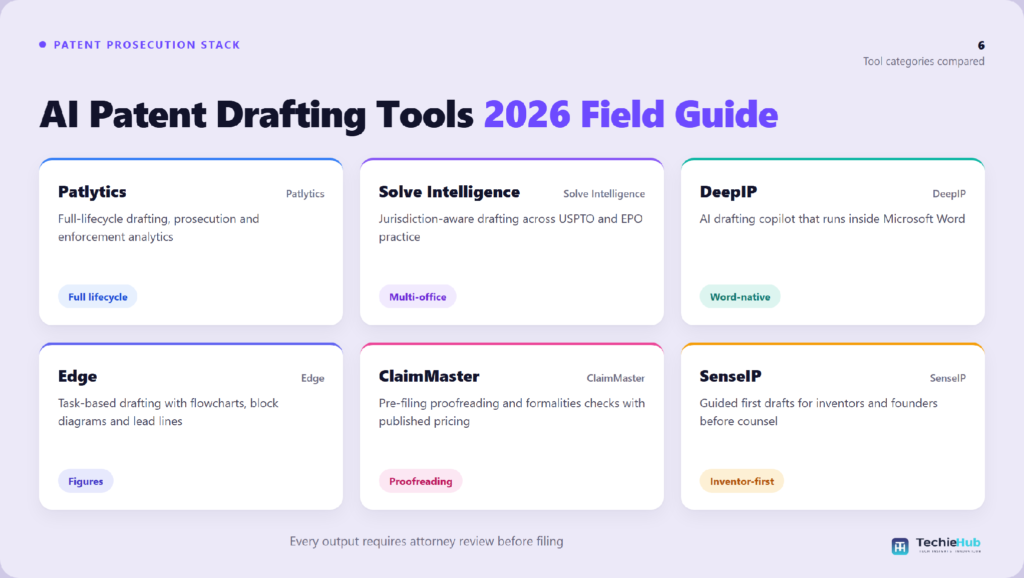
Patlytics is the broadest platform, spanning invention harvesting, drafting, infringement and invalidity analysis, due diligence and portfolio management. It raised a $40 million Series B in April 2026, taking total funding to roughly $65 million; its Am Law 100 adoption claims are vendor-reported.
Solve Intelligence focuses on jurisdiction-aware drafting and prosecution, with office-action drafting that cites source documents and case law. It closed a $40 million Series B in December 2025 and acquired ClaimWise to deepen European workflows.
DeepIP is the strongest choice for practitioners who refuse to leave Microsoft Word: it ships as a Word add-in rather than a separate platform, which measurably improves adoption. The company reports total funding of about $40 million following a $25 million Series B.
Edge breaks drafting into discrete tasks and is unusually good at figures. ClaimMaster is not a drafting engine but a proofreading and formalities layer, and remains the cheapest meaningful entry point. SenseIP and PowerPatent target founders wanting a structured first draft before engaging counsel; neither is prosecution-grade alone.
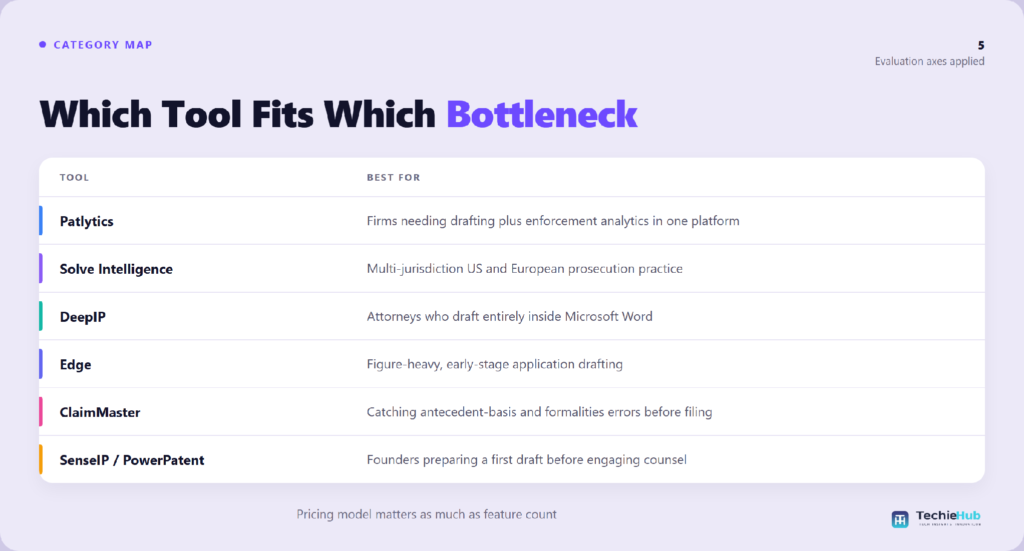
| Tool | Category | Best for | Pricing model |
| Patlytics | Full-lifecycle platform | Firms needing drafting plus enforcement analytics | Sales-led; no public price page |
| Solve Intelligence | Full-lifecycle drafting | Multi-jurisdiction US and European practice | Sales-led; no public price page |
| DeepIP | Word-native copilot | Attorneys who draft entirely in Word | Per seat, annual commitment |
| Edge | Drafting plus figures | Figure-heavy early-stage drafting | Subscription, quote-based |
| ClaimMaster | Proofreading and formalities | Catching errors before filing | Per user, published tiers, free trial |
| SenseIP / PowerPatent | Inventor-accessible drafting | Founders preparing a first draft | Tiered self-serve |
What does AI-assisted patent drafting cost?
Pricing transparency here is poor, and that is itself a buying signal. Patlytics, DeepIP and Solve Intelligence all run sales-led quotes with no public pricing page. Figures quoted in comparison posts for those vendors — commonly a few hundred dollars per user per month for Word-native tools, and multiples of that for full platforms — are third-party estimates, not published rates.
At the other end, ClaimMaster publishes per-user tiers starting under $400 per user per year with a free trial, and inventor-facing tools such as SenseIP list self-serve plans from roughly $75 per month. Budget by role: firm attorneys gravitate to full platforms or a Word copilot, in-house teams want portfolio management bundled in, and paralegals extract most value from proofreading tools. Teams sizing the wider stack should read our roundup of the best AI tools for lawyers across practice areas first.
The real cost lever is adoption, not licence fees. An enterprise platform used at a fraction of its breadth is worse value than a proofreader a paralegal opens daily.
What do the USPTO and EPO require when AI helps draft a filing?
This is where the category stops being a software comparison. The USPTO’s Guidance on Use of Artificial Intelligence-Based Tools in Practice (89 Fed. Reg. 25609, 11 April 2024) applies existing rules to AI-assisted work product rather than creating new ones. Under 37 CFR 11.18(b), signing and submitting any paper certifies that its statements are true and that the signer performed a reasonable inquiry — a certification that does not soften because a model wrote the first draft. No general obligation exists to disclose that an AI tool was used, but the duty of candour under 37 CFR 1.56 can still compel disclosure of material facts, including facts bearing on whether a human made a significant contribution to the claimed invention.
The EPO reached the same destination in 2026. Its Guidelines for Examination, in force since 1 April 2026, added a dedicated General Part section on artificial intelligence confirming that applicants and representatives remain fully responsible for the content of every submission, whether or not AI tools were used.
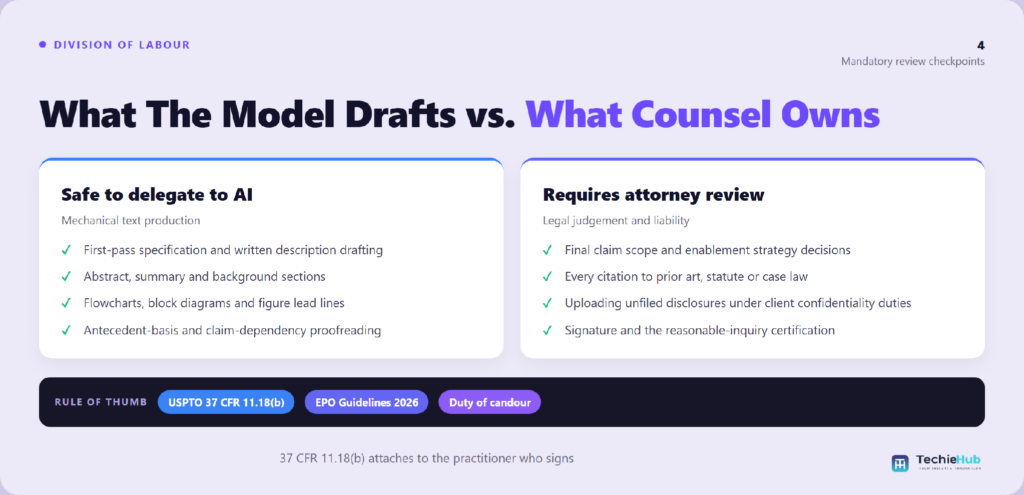
Attorney review is required at four specific points: before any claim set is finalised, because claim scope is a legal strategy decision; before any citation to prior art or case law is relied on, because fabricated authority is the single most common AI failure in legal filings; before any invention disclosure is uploaded, because confidentiality of an unfiled disclosure is a client obligation stricter than anything the office imposes; and before signature, which is where 37 CFR 11.18(b) attaches personally to the practitioner.
The citation problem is documented, not hypothetical: the AI Hallucination Cases database maintained by researcher Damien Charlotin had logged more than 1,600 court decisions worldwide involving hallucinated material by mid-2026. Nothing here is legal advice, and no tool listed removes the practitioner’s professional responsibility.
How we compared these platforms
We assessed tools on five axes: what they draft, jurisdiction coverage, deployment surface (browser versus Word), pricing transparency, and security posture for unfiled disclosures. Capability claims were checked against vendor documentation, corporate facts against primary announcements, and regulatory statements against the USPTO and EPO texts themselves.
We also corrected claims that recur in older versions of this comparison. A widely repeated “67% of in-house counsel expect to adopt AI drafting tools” statistic has no traceable primary source and has been dropped; the closest verifiable benchmark is the Thomson Reuters 2026 AI in Professional Services Report, which found 40% of professionals say their organisation now uses generative AI, up from 22% a year earlier. Patlytics’ funding is no longer a $14 million Series A, and per-vendor monthly prices quoted elsewhere are estimates. Where a model is named, current systems such as Anthropic’s Claude Opus 5, released 24 July 2026, sit underneath these products rather than being them.
How a six-person IP boutique cleared a provisional backlog
Consider a representative composite of firms this size. Priya Raman, a registered patent attorney at a six-person software-IP boutique in Austin, entered Q2 with eighteen provisional applications queued and two associates. Her constraint was not analysis; it was first-draft production time, averaging around fourteen hours per application including figures.
She deployed a Word-native copilot for specification drafting and a proofreading tool for the pre-filing pass, skipping a full-lifecycle platform the firm would never have used at breadth. Claims stayed hand-drafted. Her rule: the model never touches claim scope and never supplies a citation an associate has not independently pulled.
First-draft time fell to roughly six hours per application and the backlog cleared in seven weeks. Two generated passages cited authority that did not check out, both caught in the mandatory verification pass — precisely the outcome the workflow was designed to produce. Firms considering more autonomous setups should read our analysis of what a legal AI agent can safely automate first.
Frequently Asked Questions
What are the best AI patent drafting tools in 2026?
Patlytics and Solve Intelligence lead for full-lifecycle drafting and prosecution, DeepIP for drafting inside Microsoft Word, Edge for figure-heavy applications, and ClaimMaster for pre-filing proofreading. SenseIP and PowerPatent suit inventors wanting a first draft. The right choice depends on role, jurisdiction and whether your bottleneck is breadth or one stage.
Can AI write a patent application without a lawyer?
It can produce a complete draft, but it should not be filed unreviewed. A patent is a legal instrument and the signing practitioner certifies its accuracy under 37 CFR 11.18(b). Claim scope, enablement strategy and the duty of candour all require professional judgement that current drafting models do not supply.
Do I have to tell the USPTO that I used AI to draft?
No general or per se disclosure obligation exists under the USPTO’s April 2024 guidance. However, the duty of candour can require disclosing material facts, including whether AI contributed to claims without significant human inventive contribution. The certification and reasonable-inquiry requirements apply identically to AI-assisted and human-written papers.
How much do these platforms cost?
Pricing ranges from free trials and roughly $360 per user per year for proofreading tools to enterprise contracts negotiated per seat. Patlytics, DeepIP and Solve Intelligence publish no public rates and quote through sales, so any specific monthly figure you see online is a third-party estimate rather than a listed price.
Are AI drafting tools safe for confidential invention disclosures?
Only with due diligence. An unfiled disclosure is among a company’s most sensitive assets, and confidentiality obligations to a client are stricter than obligations to a patent office. Review each vendor’s data retention, training-use and security certifications, and obtain informed client consent before uploading unpublished technical material.
Do these tools support international filings?
Several do. Solve Intelligence and DeepIP both market jurisdiction-aware drafting across the USPTO, EPO and other offices, with format and language adapted per office. Confirm coverage in a trial using your own cases, because formal requirements differ substantially and marketing claims rarely specify depth of support per jurisdiction.
Is patent drafting software different from an AI patent drafting tool?
The terms now overlap, but the older category matters. Traditional patent drafting software — docketing suites, template libraries and proofreading checkers such as ClaimMaster — automates formatting, numbering and consistency checks without generating substantive text. AI patent drafting tools such as Patlytics, Solve Intelligence and DeepIP generate claims and specification language from an invention disclosure. Most firms end up running both: generative drafting to produce a first pass, then rule-based proofreading before filing.
How automated can patent drafting realistically be in 2026?
Automation is strongest at the first-draft and consistency layers. These platforms reliably produce claim sets, specification scaffolding, abstracts and office-action response drafts from a structured disclosure, and they catch antecedent-basis and numbering errors far faster than manual review. What none of them automate is the judgment layer: claim scope strategy, prior-art distinctions and the decision about what to leave out. Every vendor in this comparison assumes attorney review before filing, and every filing remains signed by a human practitioner.
Which AI patent tools have the best user reviews?
Practitioner feedback splits by workflow rather than by overall quality. Solve Intelligence and Patlytics draw the strongest reviews from teams wanting full-lifecycle drafting and prosecution support. DeepIP reviews well specifically with attorneys unwilling to leave Microsoft Word, since it works inside the existing document rather than a separate web app. Edge is favoured on figure-heavy mechanical and design filings. ClaimMaster keeps loyal users for pre-filing proofreading despite not being generative. Weight reviews from your own practice area — patent drafting quality varies sharply between software, biotech and mechanical subject matter.
Are there AI patent drafting services as well as software?
Yes, and the distinction affects cost and confidentiality. Software licences put your team in control: you upload a disclosure, generate a draft, and the work stays with your practitioners. Managed services layer human patent professionals on top of the same tooling and return a reviewed draft, which suits occasional filers without in-house IP staff but costs multiples of a seat licence. If invention disclosures are commercially sensitive, the software route keeps the disclosure inside fewer hands — check each vendor’s data-retention and training-use terms before uploading anything unfiled.
Conclusion
The 2026 market has consolidated around a clear split: full-lifecycle platforms for firms whose pain spans drafting, prosecution and enforcement, and sharp point tools for teams whose bottleneck sits at one stage. Funding followed the platforms — Patlytics and Solve Intelligence each closed $40 million rounds within five months — but the cheapest tools still deliver the most reliable return per dollar.
What has not changed is accountability. Both the USPTO and the EPO have put in writing that responsibility for a filing sits with the human who signs it. Treat these products as leverage on drafting throughput, verify every citation, keep claim strategy in human hands, and pair your choice with disciplined prior-art work using proper AI-assisted research tooling. The firms getting real value are not filing faster; they are spending recovered hours on claim quality.
Before drafting, most teams run a prior-art check first — see our comparison of AI patent research tools covering search, intelligence and analytics platforms.

2 Comments
I know this site provides quality depending content and extra
stuff, is there any other site which provides these kinds of information in quality?
Thank you for taking the time to share your thoughts! We truly appreciate the support and are glad you found value here. Stay connected—there’s more helpful content coming your way.